
Introduction
Welcome to EmotiPlay and thank you for choosing to work with our program.
About EmotiPlay - Who We Are
EmotiPlay was established in 2015, by its mother company Compedia , an education software company with over 30 years of experience in developing advanced technological learning solutions for millions of people all over the globe. EmotiPlay’s team of experts in digital learning and technology works with multi-disciplinary teams of world-leading researchers in the field of autism, as well as clinicians - psychologists, SLPs, OTs, Teachers, and others.
EmotiPlay’s mission is to provide engaging interactive software solutions that enhance the communication and social skills of children with autism and other social communication disorders.
About EmotiPlay’s Program
EmotiPlay’s program was carefully designed to facilitate face-to-face interaction between a child or a group of children and a significant adult, working together as a team to learn about emotions. The main user we were aiming at was a therapist or a teacher, whose role is to serve as a mediator, a partner and a “coach” to help the child learn, experience, practice and eventually generalize all they explore about emotions. The professional working with the child brings in their professional expertise, and personal connection to the child. This makes them the best personalization agents to fit the content to the child’s preferences, strengths, and difficulties. They are also the best change agents, connecting it all to the child’s environments, to significant people in their lives and to their everyday experiences.
Involving as many additional significant adults from the child’s environment may be very beneficial for generalization, namely connecting what the child learns in the program to his social environments: the family, the classroom, etc. The additional adult facilitators can be the child’s parents, or another person the parents approve of - a family member, a tutor, or any other person who knows or can get to know the child.
We are happy to have your feedback and suggestions - contact us to let us know what else we can do to facilitate your work and make it fun for you and the child! (Contact email: Info@emotiplay.com )
About this Guide
This guide aims to provide you, the professional working with the child, some information, practices and tips to maximize the benefit of using the EmotiPlay program with the child under your care.
Glossary
Here are some terms that are used alternately in this guide and in the EmotiPlay program.
Activity - Task (or Learning-task) - Question: In the EmotiPlay program, each lesson consists of a few activities, such as: quizzes, open ended questions, games etc.
Assessment - Lesson: In the EmotiPlay program, each lesson can be a basis for you to assess the child’s abilities and strengthen them as needed. Thus, EmotiPlay’s program uses UnitusTI platform “Assessments” engin e: each assessment is a lesson, containing diverse activities such as: quizzes, open ended questions, games, and fun tasks.
Category - Unit: In the EmotiPlay program, lessons are gathered under learning units in the EmotiPlay program. There are 2 introductory units, and then a unit for each emotion, containing 4 lessons: intro, face, voice and body.
Client - Child: Although the EmotiPlay program was originally designed for children, the program can serve teens and even young adults. We used the term child.
“Task Product”: In the EmotiPlay program, a task-product is whatever the child and you produce together while engaging in the program activities. For example: a text you or the child type as an answer to an open ended question, pictures of funny faces in a fun task, an image of something the child has drawn in a “Create” activity, a video clip of the child and yourself acting in a role-play, or a recording of the child expressing different intensities of an emotion in a challenge activity.
Table of Contents
A. EmotiPlay’s Program for Children with Autism
A2. The Solution - EmotiPlay’s Concept
A3. Background and Main Principles
A4. The Research Behind EmotiPlay
A5. EmotiPlay’s Target Audience
A6. An Emotional “Gym” that is Always There for You
A7. Solution for Children with Limited or no Access to Therapy
A8. Possible Models for Working with EmotiPlay
B3. Reviewing Emotiplay’s Content
B4. Assigning EmotiPlay Content to Clients
D. Session Notes - Uploading the Learning Task-Products
D1. Why is it Important to Document the Learning Process and Upload the Learning Task-Products?
D2. Examples of Possible Task-Products and their Documentation
D3. Creating a New Session Note: Type-in Your Notes and Attach Images, Voice and Video Files
D4. Viewing Clients Session Notes and Attachments
The EmotiPlay Program Structure
Table 1: The EmotiPlay Program Lesson Types
How to Run the Activities in EmotiPlay Program
Table 2: Activities in the EmotiPlay Program
Further EmotiPlay Content and Intervention Practices Support
Appendix 2: EmotiPlay Characters
Table 3: EmotiPlay Animated Characters
Table 4: Characters in Emotiplay’s Real People Media
EmotiPlay’s Program for Children with Autism
A1. The Need
Children and adults on the autistic spectrum experience difficulty in “reading” the emotions and mental states of others as well as their own. They often fail to communicate their needs and intentions and advocate themselves. These abilities are critical in order to efficiently communicate with one’s environment.
The fundamental and lifelong difficulty in communication leads to a variety of complex challenges:
- Acquiring an education and a vocation
- Continuous exposure to a variety of abusive behaviors toward them
- A high probability of bearing the consequences for non-appropriate behavior
- Secondary problems that are liable to develop or intensify


A2. The Solution - EmotiPlay’s Concept
EmotiPlay addresses this need by using a platform for social learning.
Social interaction is like swimming or driving – to learn it you have to jump in the water and do it, and you have to practice it - theory is essential but not enough - it’s just the beginning of a process.
- EmotiPlay is a therapeutic educational tool : the children engage in learning and practice activities together with an adult: e.g. a therapist / teacher / mentor, etc. EmotiPlay can be used for individual, dyad or group work.
- EmotiPlay suggests a huge pull of activities to learn the cues for emotions in the face, voice and body , and practice emotion recognition.
- EmotiPlay’s program goes beyond mere emotion recognition, and offers activities to understand emotions and mental states in context .
- EmotiPlay’s program relates the learned recognition skills to broader issues such as perspective taking, empathy and Theory of Mind.
- Emotiplay supports generalization by referring to the child’s experiences in their natural environments.
- Important emotion related skills and habits are developed by a methodological repetition of communicative tasks.
- EmotiPlay supports and facilitates face-to-face work, distance learning, or a combination of the two.
- The core content was developed with global experts and has been validated through research ( Fridenson-Hayo et.al 2017 ).
Interaction is the Goal! The focus and heart of the program is the caretaker-child interaction while engaging in social tasks. (Interactivity is a mean, one of many).
A3. Background and Main Principles
“Autism Spectrum Conditions (ASC ) are neurodevelopmental conditions characterized by social-communication and interaction difficulties, circumscribed interests and a preference for sameness and repetition. Individuals with ASC experience significant difficulties attending to socio-emotional cues and interpreting them correctly [1–3]. Such emotion recognition deficits have been found in various modalities, including facial expressions [4–6], vocal intonation [7, 8], body language [9, 10] and their integration in context [11–13]. These emotion recognition difficulties are part of the social communication deficits defining ASC [14]. They have been found to negatively correlate with social skills and social competence [3, 15], and to predict adaptive socialization difficulties [16]. The emotion recognition deficits found in individuals with ASC are developmental in nature [4, 17]. Developmental studies have revealed that infants and toddlers with ASC fail to attend to salient socio-emotional cues [18–20]. These socio-emotional attention deficits may lead to lack of specialization in the social neural network, resulting in impaired social behaviors and functioning [21]. Redirecting children’s attention to these cues may facilitate emotion recognition and, consequently, social functioning [22, 23].” (Quotation from Fridenson et.al, 2017)
EmotiPlay makes emotional learning easier with a comprehensive, research-based learning tool designed specifically for kids with autism. Supported by robust research and endorsed by leading autism experts, EmotiPlay gives kids the tools they need to thrive. Research has shown that systematic use with the support of an adult mediator can result in significant improvement in a child’s emotion recognition and socialization.
With Emotiplay’s program, the children are expected to:
- Improve their ability to identify emotions (cues in the face, voice and body).
- Understand various aspects of “the language of emotions”, such as common behaviors, ToM, and perspective taking.
- Learn to connect the above to social situations, through everyday interaction with their close environment.
- Generalize this knowledge and use it in the real world.
- Achieve more effective communication with their environment.
More Benefits:
- The children will adopt an efficient emotional conversation in order to express themselves and to advocate for themselves.
- The children will learn the laws of conduct and behavior in a social network.
To achieve these goals, we use:
- Dozens of fun animated video lessons.
- Learning by doing tasks for practicing the identification of cues learned in the lessons.
- Integrative tasks that connect to a social context.
- Tasks for the enrichment of emotional language: vocabulary, semantics, pragmatics.
- Suggestions for social interaction games and fun face-to-face activities to enhance generalization.
- Ideas for occupational therapy DIY, art and creative activities.
A4. The Research Behind EmotiPlay
The European Union reviewed EmotiPlay under the auspices of ASC-Inclusion, a large-scale study to investigate how technology can help children with autism learn “the language of emotion” in order to improve their inclusion and integration in society. The ASC-Inclusion study of EmotiPlay, conducted in partnership with Cambridge University in the UK, Karolinska Institutet in Sweden, and Bar-Ilan University in Israel, demonstrated improved recognition of emotion in all modalities after 8-12 weeks of intervention in three separate cultural contexts. The platform demonstrated significant potential in addressing the needs of children with autism and helping them overcome emotion recognition difficulties.
- All videos, audio, and images used in the study were validated as part of the EU-Emotion Stimulus Set, a collection of dynamic multimodal emotion and mental state representations. Validation ensures that the content demonstrates the emotions it purports to show.
- The content was created locally using actors from each participating country, and was culturally validated in each participating country.
- The control groups continued their ongoing therapy, educational programs, and traditional methods, but did not receive any new interventions.
- The standardized SRS scale was used for evaluation.
- At the end of the study, the children were tested with new stimuli not used in the intervention, and compared to children who didn’t. The group who learned and practiced Emotiplay’s content was significantly better in emotion recognition than the group of children who didn’t.
Bottom line: The research showed that using EmotiPlay’s content improved the emotion recognition and related social and communicative skills in children with autism.
To read more, download the study overview .
A5. EmotiPlay’s Target Audience
- High-functioning autistic individuals aged 4 and up and their families.
- Clinics working with children on the autistic spectrum or other communication disorders, individually or in groups.
- Educational institutions - schools, special ed classes.
- Special ed organizations.


A6. An Emotional “Gym” that is Always There for You
EmotiPlay’s program is aimed to serve as an emotional “gym” that grows with the child, that can be accessed anywhere, anytime. The program supports different devices: desktop computers, laptops, tablets and iPads, and even smartphones and iPhones. It is therefore possible and recommended to “take it out to the real world” when feasible, to support generalization.


A7. Solution for Children with Limited or no Access to Therapy
EmotiPlay can be used as a telehealth intervention program, when the child’s accessibility to therapy is limited, for any reason (e.g. in times of pandemic lockdown, due to physical limitations, geographical distance etc.).


A8. Possible Models for Working with EmotiPlay


Getting Started
Here are the steps to Start Using EmotiPlay’s program with your clients:
B1. Log in
B2. Client setup
B3. Reviewing Emotiplay’s content
B4. Assigning content to clients
B1. Log In
Open a new web browser and enter in the URL address:
United States & Australia subscribers: https://unitustherapy.mundopato.com
Canada subscribers: https://unitusti.mundopato.ca/
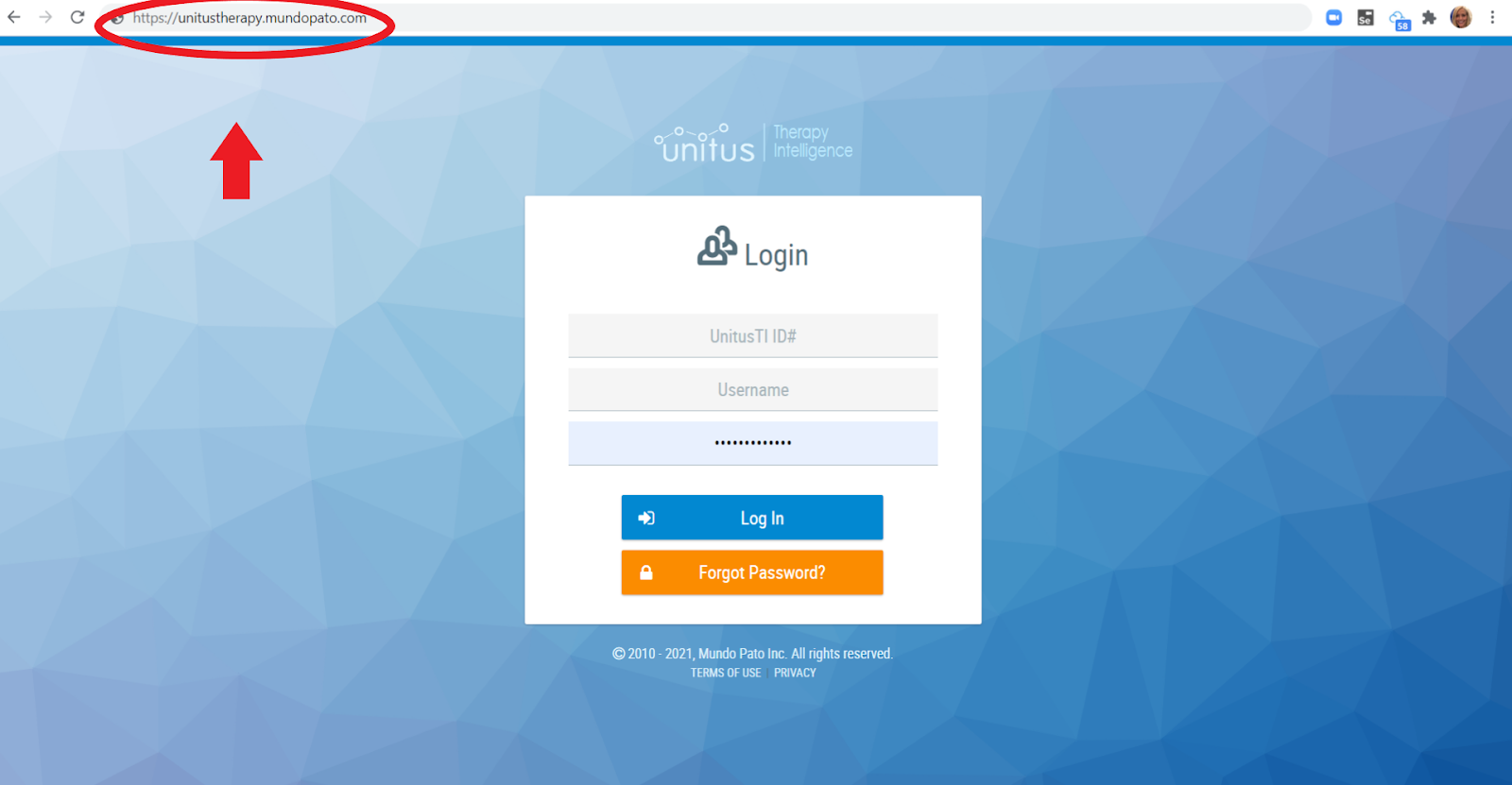
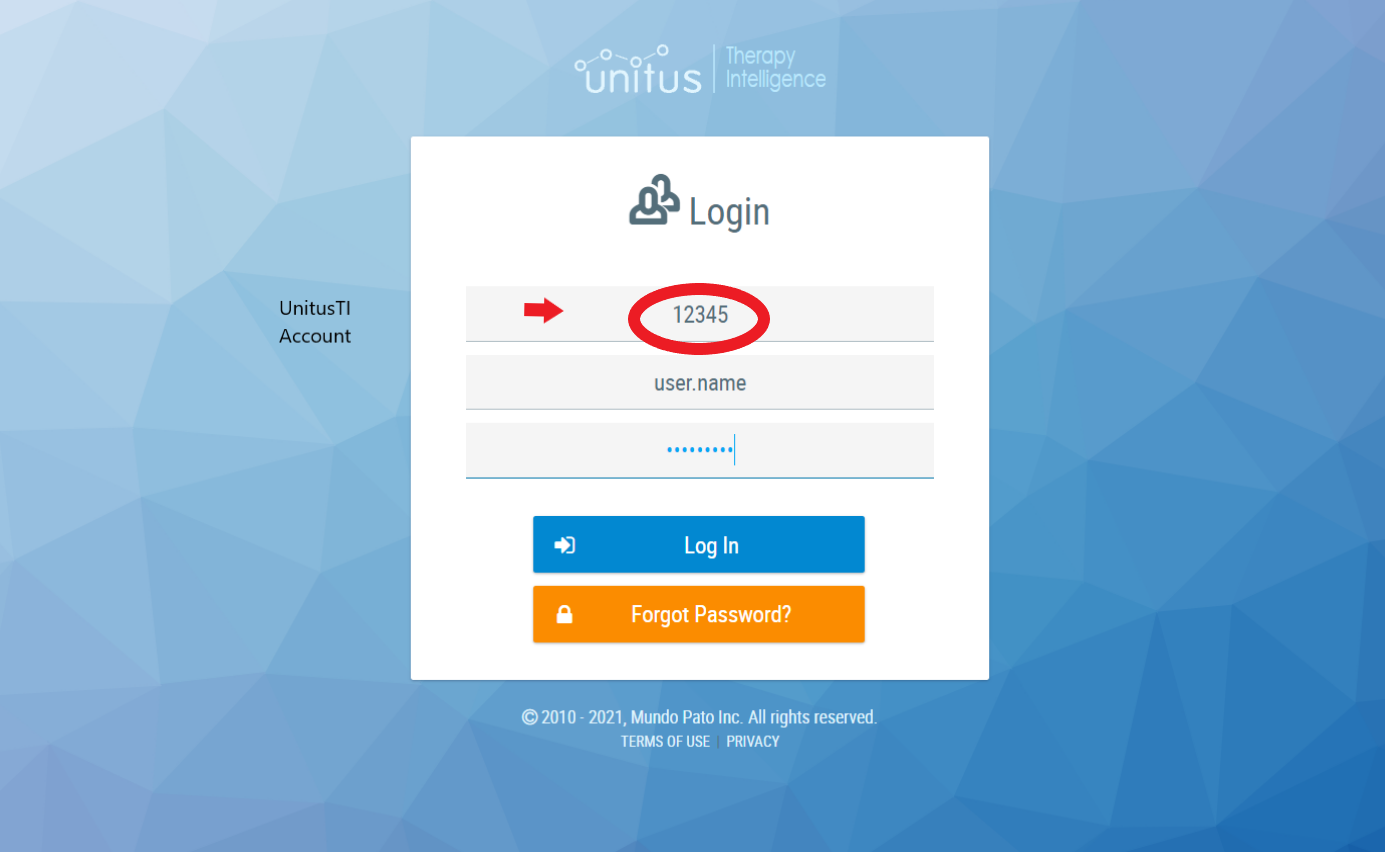
Enter in your login info: UnitusTI ID#, username, password
The UnitusTI ID# is your account number. For example “12345”
You should now see this screen (possibly with your logo):

B2. Client Setup
Please refer to:
https://www.mundopato.com/unitusti-tutorials-videos#center
, for Videos and articles about setting up your center and clients
(Center Information, Service Codes, My Clients, User List)

B3. Reviewing Emotiplay’s Content
EmotiPlay’s content is a structured program designed to facilitate the teaching of emotion recognition and understanding. It offers practice activities to support learning, and learning-by-doing tasks that aim to create semi-natural learning opportunities within the interaction between the adult and the child, as well as social interaction with others. The program includes:
- A general introduction unit containing 2 lessons
- Another introductory unit on the basic concepts used in the program, containing 4 lessons
- A learning unit for each of the emotions chosen for the program, each containing 4 lessons:
- An Introduction to the emotion
- The emotion in the facial expression
- The emotion in the voice and speech
- The emotion in the body - other people’s as well as our own
Each lesson can be a basis for you to assess the child’s abilities and strengthen them as needed. Thus, EmotiPlay’s program uses UnitusTI platform “Assessments” engine: each assessment is a lesson, containing diverse activities such as: quizzes, open ended questions, games, and fun tasks .
To learn more about the program structure, lesson templates and activity types, please go to Appendix 1: Emotiplay Content .
To review Emotiplay’s learning units, lessons and activities on the UnitusTI platform, follow the steps described below.
Click “Assessments” in the left menu, to open the Assessments sub-menu:


Choose “Categories” in the submenu for an overview of the learning units:

Click “Assessments List” in the menu to review the lessons list:

To watch the list of lessons in order, sort the lessons by name by clicking the “Name” title of the left most column in the table.
You can search for a particular lesson by typing in the search field under the title “Name” in the table.
To navigate to the next lessons in the list click the page numbers at the bottom.
To review a lesson, click the blue “Details” button at the right end of this lesson’s raw:

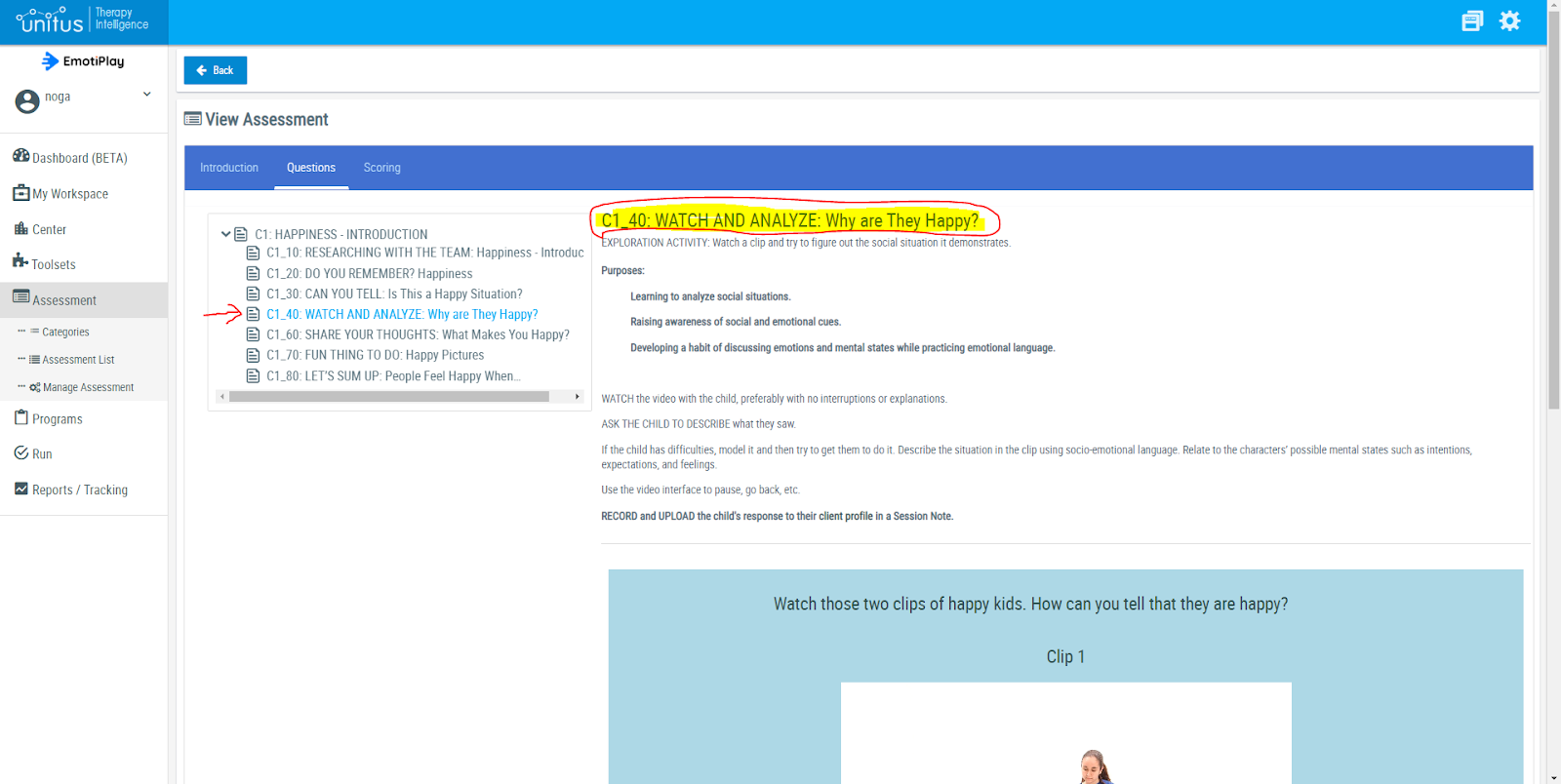
Once you are inside a lesson, click the “Questions” tab to review the lesson’s activities list:

Click the small arrow next to the lesson name to open the lesson’s activities list:

You can now see the lesson’s guidelines and tips to the right, and the activities list to the left.
The capitalized part of the activities’ names is the activity-type, followed by the lesson specific content for this activity.
Click each activity name to review it. You will then see the description, purposes, guidelines and tips for this activity-type at the right:
The guidelines for an activity-type are the same for all the emotions, so once you experience an activity-type a few times, you will probably remember the guidelines and you will no longer need to re-read them again.
At the end of the guidelines part, under the line, you will find the content and media to work on with the child.
B4. Assigning EmotiPlay Content to Clients
Before you can start to work with your clients on EmotiPlay content you will need to assign each client the content that fits your therapeutic/ educational goals.
Click “Manage Assessment” in the left menu to see your clients list.

- Click on the “ Actions” icon at the rightmost end of the chosen client’s raw:
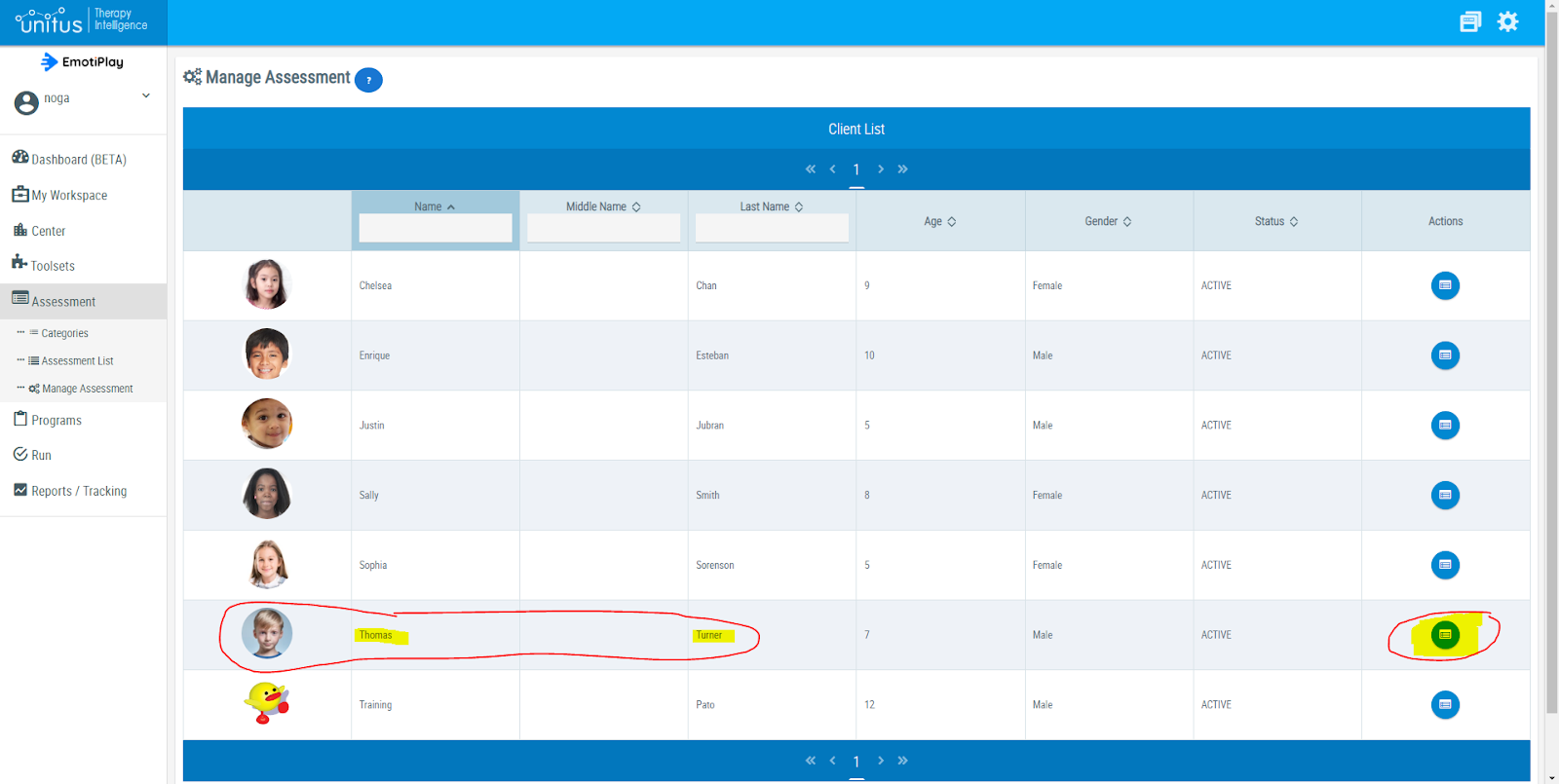
- The assessment list will be empty before you assign any content. It will fill with the assessments you will assign to this client.
Click the “Assign Assessment” tab:
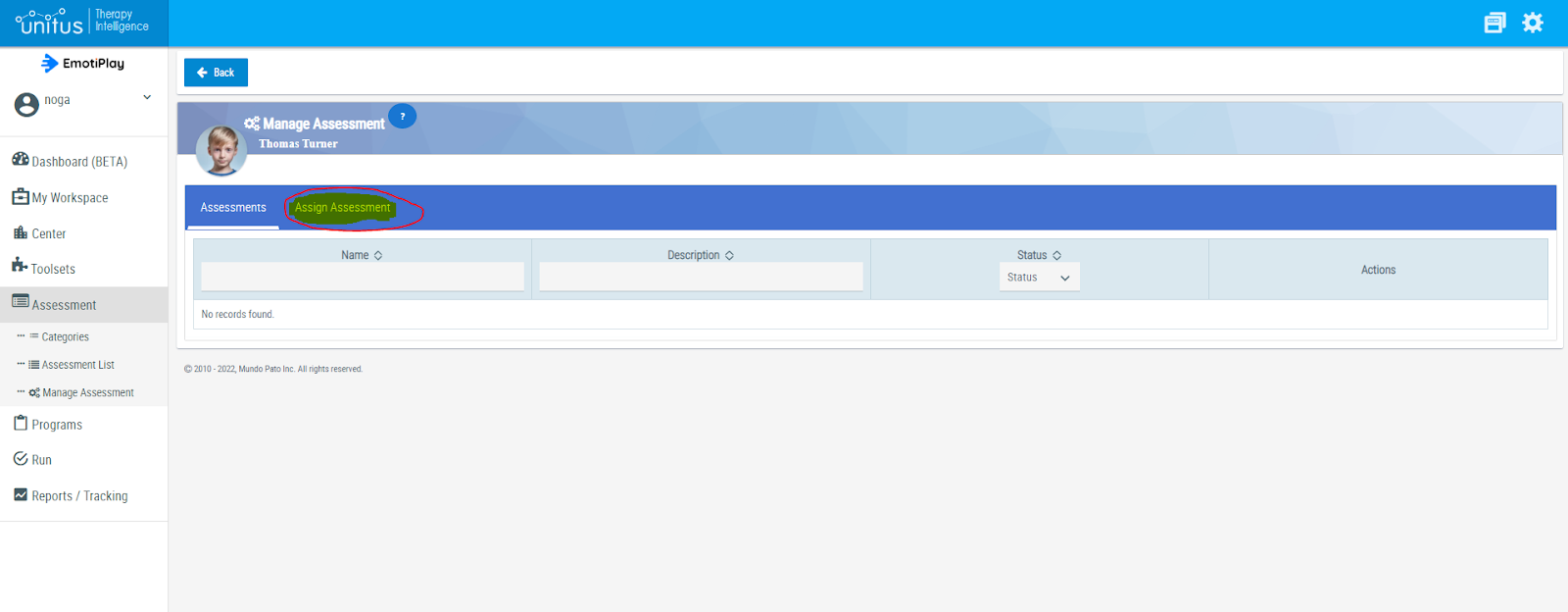
You will see the list of all the assessments (lessons) in the Emotiplay program.
You can use the search field under the title “Name” or under the title “Description” in the table, to search for a specific assessment (lesson) by keyword (e.g. “face”, “voice” or “body”).
To view an assessment click the “Details” (looking glass) icon.
To assign an assessment (lesson) to the chosen child, click the “Assign” icon (the one with the “+” sign).

While the selection of the lessons (assessments), the activities (questions), and the order you choose to work on them with the client, are entirely up to you, here are some recommendations:
- We warmly recommend starting with the introductory learning unit (lessons A1, A2) and then going through the “Cues for Emotions” learning unit (lessons B1, B2, B3 and B4) since they present the basic vocabulary and concepts to be used throughout the program, as well as activities to help the child practice on them.
- When starting to go through the emotion units, you will find that each lesson is stand alone. Note, though, that in some of the units, in the “Researching with the Team” video clips there might be a storyline going throughout the unit and beyond a certain lesson, so again our recommendation is to go through all of a unit’s lessons by order so as to follow the storyline .
If you went over all the above steps, everything is ready, you’re good to go!
C. Running Assessments
Running a lesson (assessment) in UnitusTI is quick and easy. Here is what you need to know:
Click “Run” in the left menu to open the submenu. Click “Run Assessments”:

For the child you want to work with, click the “Details” icon at the rightmost end of this child’s raw :

You will see the list of lessons (assessments) you assigned to the child.
Click the “Execute Assessment” icon at the rightmost end of the raw for the assessment you currently want to run:
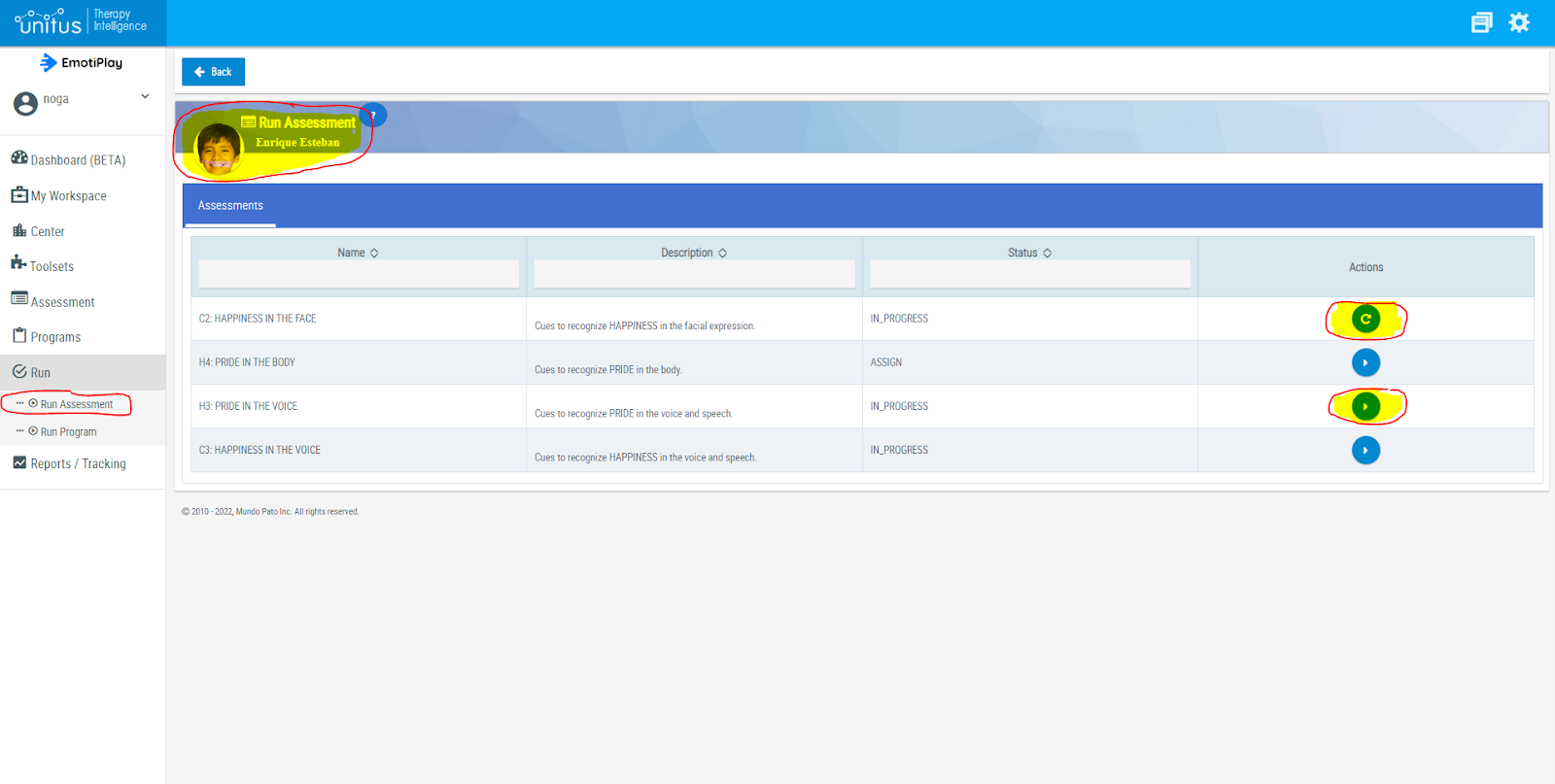
(If you want to choose another assessment (lesson) click “Back to List”).
To run the chosen assessment (lesson), you will need to confirm by clicking the notifications that appear on the upper-right corner of the screen:

You will see the lesson description.
Use the “Next Section” button at the upper-right corner to go to the first activity, and then to go through the activities by the recommended order.
You can also use the “Sections” button to open a list of the lesson’s activities and navigate between them.
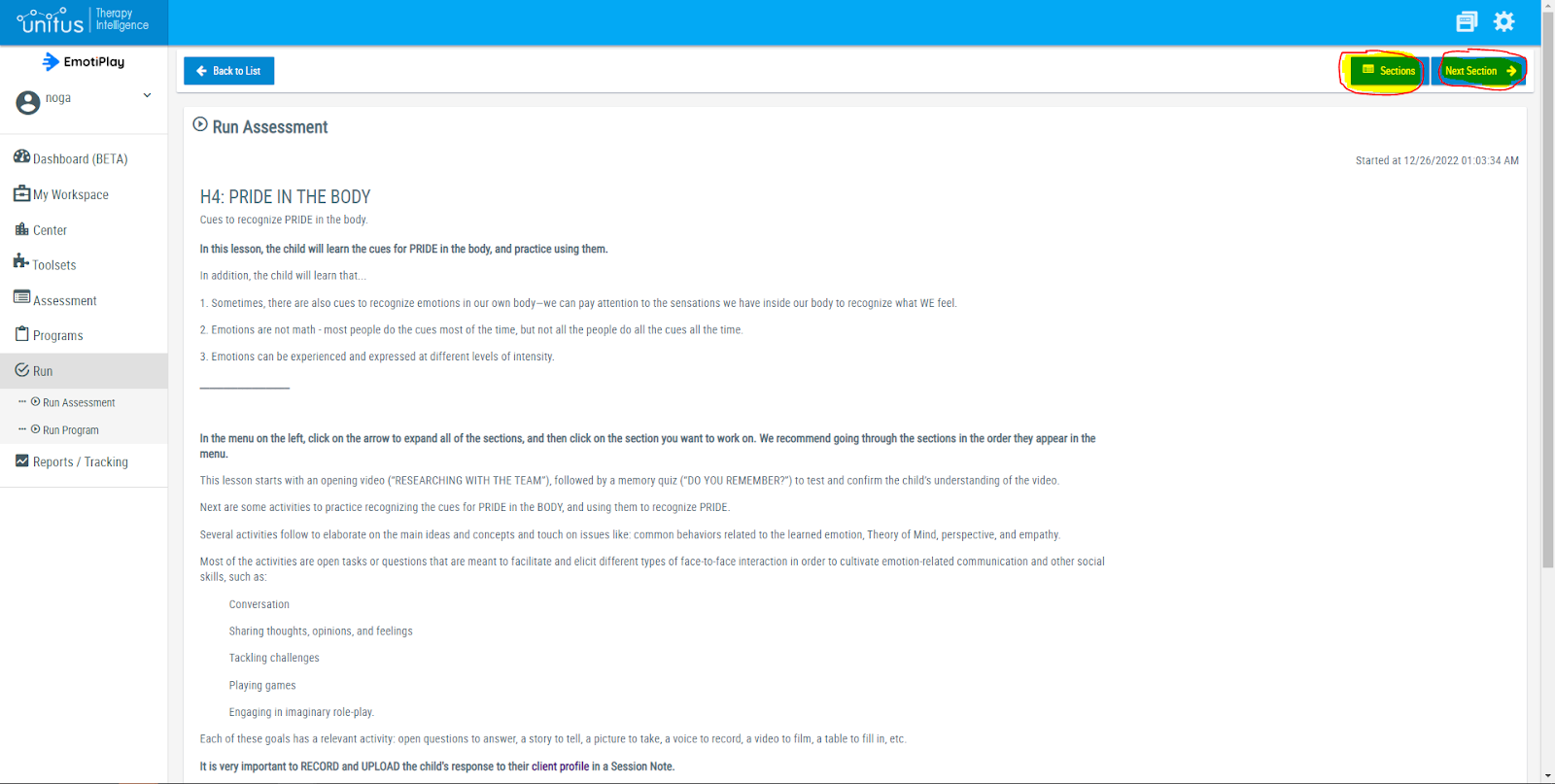

Go over the lesson activities with the child as described in each activity guidelines.
An activity can be a video to watch, a quiz to engage in, a task to do together, a point to discuss or share, a game to play, etc.
Some of the activities end with questions to answer. Type-in the child’s answers and/or your comments in the answer field at the bottom of the screen below the task text.
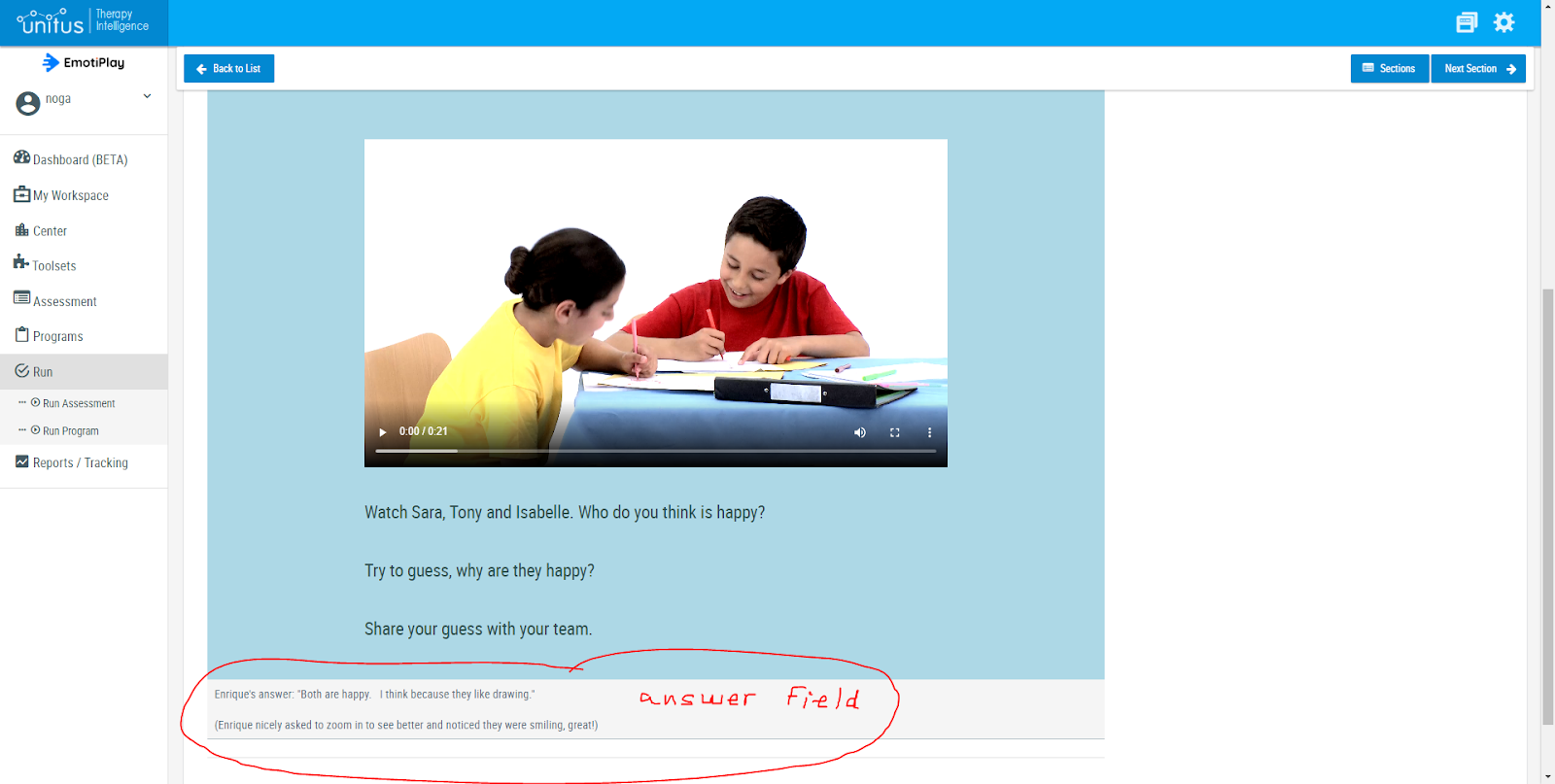
Some of the activities should result in a product such as a drawing or a picture you take. Make sure to upload the child’s product in the child’s “Session Notes”. (see explanation on how to do that below).
Some activity tasks require filming a video. Make sure to have a quality clip, keeping the environment quiet with minimum possible background noises, good lighting, and a good focus on what you want to film. Upload the clip in the child’s “Session Notes”. (see explanation on how to do that below). Clips will probably be a few minutes long, but sometimes they may be longer. A clip maximum size to upload to “Session Notes” can be up to 30mb - which is about a 9-10 minutes clip.
Make sure to empower the child with specific feedback on wanted behaviors.
D. Session Notes - Uploading the Learning Task-Products
In the EmotiPlay program, a task-product is whatever the child and you produce together while engaging in the program activities. For example: a text you or the child type as an answer to an open ended question, pictures of funny faces in a fun task, an image of something the child has drawn in a “Create” activity, a video clip of the child and yourself acting in a role-play, or a recording of the child expressing different intensities of an emotion in a challenge activity.
UnitusTI supports up to 50 Gigabyte of storage to let you keep a large amount of data. Below are some of the data we recommend to keep and an explanation of how to upload them to UnitusTI.
D1. Why is it Important to Document the Learning Process and Upload the Learning Task-Products?
Documenting the learning process is done in UnitusTI by uploading data to each child’s session notes. This is important for several reasons, the main of which are:
- Progress tracking
- Sharing information with the child’s parents
- Sharing professional data with other authorized professionals
- Repetition of learning materials and related experiences
- Official requirements
D2. Examples of Possible Task-Products and their Documentation
Some activities such as quizzes are automatically documented, while others require your active actions.
Games - We suggest to film the whole interaction and then choose significant moments to cut and upload. A game interaction can be a very powerful tool to analyze the child’s emotion related skills, as well as social skills in general. Does the child look at his/her play partner? Did the child develop the habit of looking for clues for emotions (e.g. does he look at the facial expression?) Does the child use emotional words? Does he react to the play partner in an age appropriate way? These are just a bit of the questions you can ask and document in session notes following the filming of a game interaction. Once you have a few of those over a period of time, you can analyze and show progress to the child’s parents and other relevant people.
Open ended questions - You can type the child’s response and any other relevant info using the text field, and/or you can record or film the child and upload the voice/video file (see explanation on how to upload below).
“Acting out” activities: Role Playing and Perspective Taking - Film the child and yourself and upload the video file. (see explanation on how to upload below).
Researching with the Team clips - This activity requires watching a clip only. Notes: Did the child watch the clip? How many times? Was he/she focused on the clip? Any questions asked or anything commented on the clip content?
Quizzes and closed ended questions - The results of these activities are saved in the system automatically. Note, though, that while you can repeat the activities as many times as you or the child want, only the first time is recorded.
Language tasks - These activities focus on the spoken language aspect of emotions, e.g. vocabulary, prosody and indirect speech. Film or record the child and upload the voice/video file. This can be a basis for progress analysis as described above for games.
Conversation and sharing activities - Same as “Games” above.
Home assignments - If you decide to assign a home assignment to the child and immediate carers, you can ask them to send it to you and upload the file to the related lesson’s session notes.
Emotion recognition practice activities (closed ended) - It is very much recommended to repeat those activities while learning the lesson, and also go back to them as you proceed to the next lessons and units. Learning about emotions is kind of like learning a second language in the sense that if the child doesn’t use and repeat what you learned together, they might forget some of it. The results of these activities are saved in the system automatically. Note, though, that while you can repeat the activities as many times as you or the child want, only the first time is recorded.
“Let’s Sum-Up”, lesson summary activity - This activity’s aim is to give you, the professional working with the child, a way to assess the child’s learning in a concise and quantitative way, before moving on to the next lesson/unit. We suggest treating it like a test for your needs, letting the child answer without help, but also without any “test” feel or behaviors. Rather, while conducting it to the child try to treat it like a quiz that is a bit challenging because they are expected to do it on their own. The results of these activities are saved in the system automatically.
Family assignments - Involving the family in the program may be very beneficial for generalization. You can assign them a task and ask them to send you the result as a file (e.g. take a picture, sing a song, make a phone call etc.). You can then upload it to the related lesson’s session notes.
D3. Creating a New Session Note: Type-in Your Notes and Attach Images, Voice and Video Files
Uploading session notes to a child’s profile is done in a few simple steps:
- Click the “New Note” icon in the child’s row at “My Clients” list (under the “Center”entry in the left menu )
- Type-in your notes and attach images, voice and video files
- Publish
Below is a detailed step by step guide:
Click “Center” in the left menu, and then “My Clients”. You will see the list of clients you have on UnitusTI. Click the

Click the “Session Notes” icon at the rightmost end of the row for the child you want to add session notes to (the notebook icon):
You will get the child’s “Session Notes Details” screen. It will be empty the first time you go in, as in the screenshot below, and then any new session note you add will appear in this table.

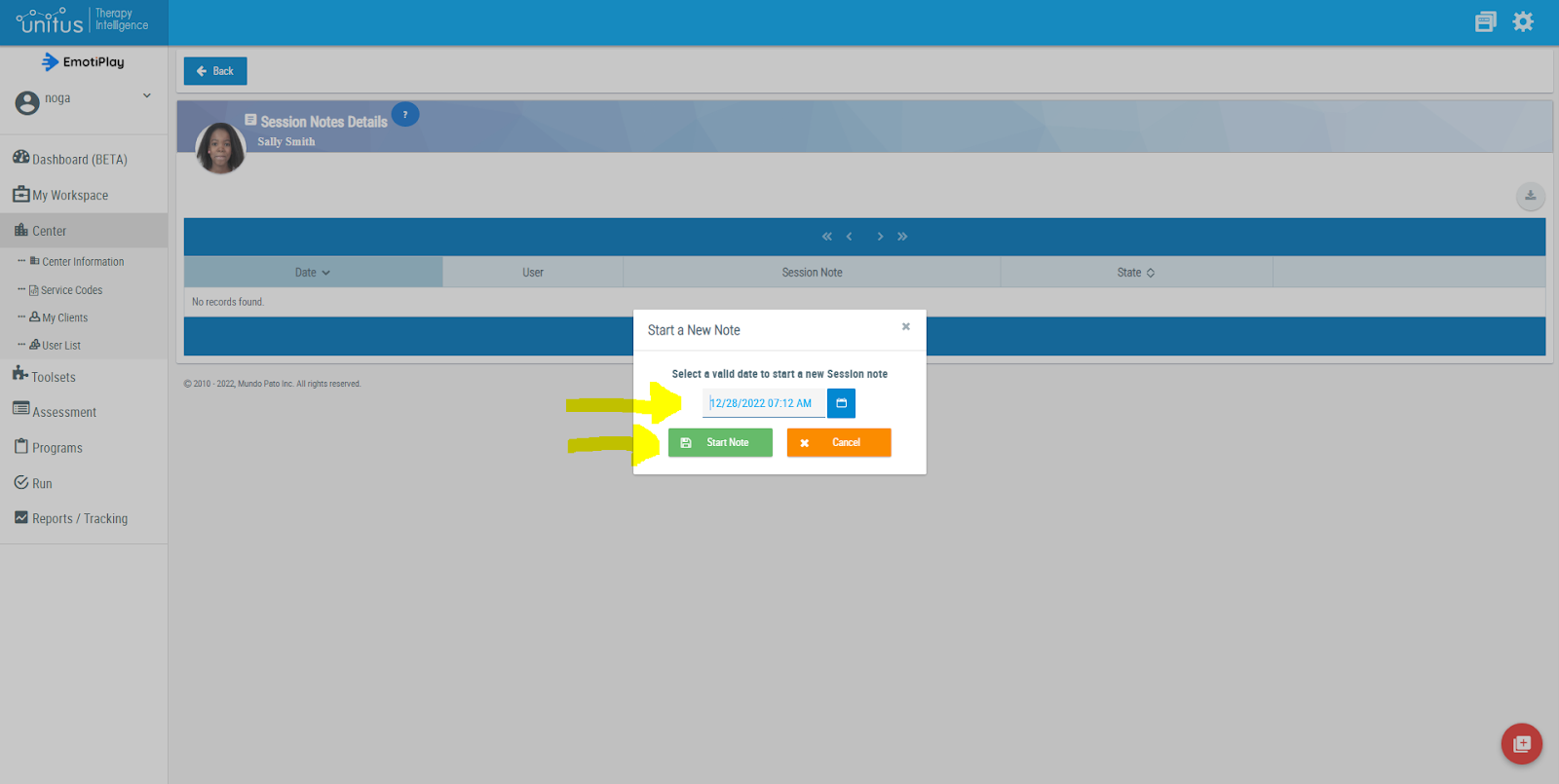
In the child’s “Session Notes Details” screen, click on the “New Note” red icon in the bottom right corner of the screen:

Select the date and choose “Start Note” in the pop-up window:
Type-in your notes in the notes field.
You can add tags to your note by clicking your keywords in the tags field, and then clicking “Enter” after each tag. Tags are useful for searching and sorting.

To add more fields to your note, click the arrow at the right end of the “Fields” field, and then choose the fields you want to add from the dropdown list:

To attach files to your note, such as images, video clips, and voice recordings (as listed above), click the “Attachments” tab, and then the “Upload Document” button at the top of the table:

Type-in a description to the file you want to upload, then click “Choose a document”, choose the file to upload in the downloading window, and click “Open” at the bottom of this window:

When you are done updating your note, click the “Update” button at the upper right corner of the screen to save your note.
When the note is complete, sign at the “Signature” field, fill in your name below, and then click the “Finish” button at the upper right corner of the screen. Note that once you do that you cannot update this note anymore.

D4. Viewing Clients Session Notes and Attachments
To go back to the session notes you have uploaded for a child and review them, go to “My clients” list” as explained above, and use the “Session Notes” icon at the child’s row to go to their “Session Notes Details” screen. You will see a list of all the session notes you have uploaded. You can view the notes by clicking the “Details” icon (the looking glass).
You can delete a session note by clicking the “Remove Session Note” icon (garbage can icon), but note this action cannot be undone.
You can export session notes by clicking the “Export” icon (rightmost, with the arrow).

The attachments you uploaded are stored in the system, and you can review them by downloading them: for a session note to which you have attached a file/ files, click the “Attachments” tab and then the “Downloading” icon.

E. References
1. Golan O, Sinai-Gavrilov Y, Baron-Cohen S (2015) The Cambridge Mindreading Face-Voice Battery for Children (CAM-C): complex emotion recognition in children with and without autism spectrum conditions. Mol Autism, 6:22.
2. Kuusikko S, Haapsamo H, Jansson-Verkasalo E, Hurtig T, Mattila M-L, Ebeling H, Jussila K, Bölte S, Moilanen I (2009) Emotion recognition in children and adolescents with autism spectrum disorders. J Autism Dev Disord, 39:938–45.
3. Uljarevic M, Hamilton A (2012) Recognition of Emotions in Autism: A Formal MetaAnalysis. J Autism Dev Disord 43(7): 1517-1526.
4. Hobson RP (1986) The Autistic Child’s Appraisal of Expressions of Emotions. J Child Psychol Psychiatry 27:321–342.
5. Deruelle C, Rondan C, Gepner B, Tardif C (2004) Spatial Frequency and Face Processing in Children with Autism and Asperger Syndrome. J Autism Dev Disord 34:199–210.
6. Golan O, Baron-Cohen S, Hill J (2006) The Cambridge Mindreading (CAM) Face-Voice Battery: Testing Complex Emotion Recognition in Adults with and without Asperger Syndrome. J Autism Dev Disord 36:169–183.
7. Boucher J, Lewis V, Collis GM (2000) Voice Processing Abilities in Children with Autism, Children with Specific Language Impairments, and Young Typically Developing Children. J Child Psychol Psychiatry 41:847–857.
8. Golan O, Baron-Cohen S, Hill JJ, Rutherford MD (2007) The “Reading the Mind in the Voice” test-revised: a study of complex emotion recognition in adults with and without autism spectrum conditions. J Autism Dev Disord 37:1096–106.
9. Grèzes J, Wicker B, Berthoz S, de Gelder B (2009) A failure to grasp the affective meaning of actions in autism spectrum disorder subjects. Neuropsychologia 47:1816–25.
10. Philip RCM, Whalley HC, Stanfield AC, Sprengelmeyer R, Santos IM, Young AW, Atkinson AP, Calder AJ, Johnstone EC, Lawrie SM, Hall J (2010) Deficits in facial, body movement and vocal emotional processing in autism spectrum disorders. Psychol Med 40:1919–29.
11. Capps L, Yirmiya N, Sigman M (1992) Understanding of simple and complex emotions in non-retarded children with autism.pdf. J child Psychol psychiatry 35:1169–1182.
12. Golan O, Baron-Cohen S, Golan Y (2008) The “Reading the Mind in Films” Task [child version]: complex emotion and mental state recognition in children with and without autism spectrum conditions. J Autism Dev Disord 38:1534–41.
13. Silverman LB, Bennetto L, Campana E, Tanenhaus MK (2010) Speech-and-gesture integration in high functioning autism. Cognition 115:380–393.
14. American Psychiatric Association (2013) Diagnostic and Statistical Manual of Mental Disorders. 5th ed. American Psychiatric Association, VA.
15. Young RL, Posselt M (2012) Using The Transporters DVD as a Learning Tool for Children with Autism Spectrum Disorders (ASD). J Autism Dev Disord 42:984–991.
16. Hudepohl MB, Robins DL, King TZ, Henrich CC (2015) The role of emotion perception in adaptive functioning of people with autism spectrum disorders. Autism 19:107–112.
17. Baron-Cohen S (1995) Mindblindness : An Essay on Autism and Theory of Mind. MIT Press/Bradford Books, Boston.
18. Jones W, Klin A (2013) Attention to eyes is present but in decline in 2–6-month-old infants later diagnosed with autism. Nature 504:427–431.
19. Joens EJH, Gliga T, Bedford R, Charman T, Johnson MH (2014) Developmental pathways to autism: A review of prospective studies of infants at risk. Neurosci Biobehav Rev 39:1–33.
20. Landa RJ, Holman KC, Garrett-Mayer E (2007) Social and Communication Development in Toddlers With Early and Later Diagnosis of Autism Spectrum Disorders. Arch Gen Psychiatry 64:853–864.
21. Johnson MH, Griffin R, Csibra G, Halit H, Farroni T, de Haan M, Tucker LA, Baron-Cohen S, Richards JE (2005) The emergence of the social brain network: evidence from typical and atypical development. Dev Psychopathol 17:599–619.
22. Dawson G (2008) Early behavioral intervention, brain plasticity, and the prevention of autism spectrum disorder. Dev Psychopathol 20:775–803.
23. Howlin P (1998) Psychological and Educational Treatments for Autism. J Child Psychol Psychiatry 39:307–322.
24. Fridenson-Hayo S, Berggren S, Lassalle A, Tal S, Pigat D, Meir-Goren N, O'Reilly H, Ben-Zur S, Bölte S, Baron-Cohen S, Golan O (2017). 'EmotiPlay': serious game for learning about emotions in children with autism: results of a cross-cultural evaluation. European child & adolescent psychiatry 26.
Appendix 1: Emotiplay Content
The EmotiPlay Program Structure
Emotiplay’s program is designed to present a clear methodological way to learn about emotions.
This structure is aimed at making the chaotic, unexpected, confusing world of emotions, more accessible to children with autism, who often prefer systematic, predictable environments. This approach enables the child to feel comfortable and safe and thus relax and focus on the content. However, the world of emotions and social interactions is not very consistent and structured, and much flexibility is needed to cope with the social environments’ ever changing and often unclear demands. The program offers ways to cope with some of that, too.
The program comprises of learning-units, each containing a few (usually 4) lessons. A lesson contains 6-12 activities.
A typical lesson begins with an animated video, followed by a memory quiz to make sure the child understood the video. It ends with a test quiz to assess the child’s understanding of the whole lesson. In between there are several diverse activities and tasks to practice emotion recognition, and touch other aspects of emotions, and emotion related abilities and social skills.
Below you will find the structure of the program, and then the lesson templates and activities tables.
Unit 1 : Introduction
Lesson A: Researching Emotions Together
Lesson B: Why are Emotions Important?
Unit 2 : Clues for Emotions
Lesson 1 : Emotions and the Face
Lesson 2 : Emotions and the Voice
Lesson 3 : Emotions and the Body
Lesson 4 : Emotions Inside the Body
Unit 3 : Happiness
Lesson 1 : Happiness - Introduction
Lesson 2 : Happiness in the Face
Lesson 3 : Happiness in the Voice
Lesson 4 : Happiness in the Body
Unit 4 : Sadness
Lesson 1 : Sadness - Introduction
Lesson 2 : Sadness in the Face
Lesson 3 : Sadness in the Voice
Lesson 4 : Sadness in the Body
Unit 5 : Fear
Lesson 1 : Fear - Introduction
Lesson 2 : Fear in the Face
Lesson 3 : Fear in the Voice
Lesson 4 : Fear in the Body
Unit 6 : Anger
Lesson 1 : Anger - Introduction
Lesson 2 : Anger in the Face
Lesson 3 : Anger in the Voice
Lesson 4 : Anger in the Body
Unit 8 : Pride
Lesson 1 : Pride - Introduction
Lesson 2 : Pride in the Face
Lesson 3 : Pride in the Voice
Lesson 4 : Pride in the Body
Unit 9 : Kindness & Unfriendliness
Lesson 1 : Kindness and Unfriendliness - Introduction
Lesson 2 : Kindness and Unfriendliness in the Face
Lesson 3 : Kindness and Unfriendliness in the Voice
Lesson 4 : Kindness and Unfriendliness in the Body
EmotiPlay Lesson Templates
EmotiPlay program has 4 typical lesson types, repeating in each and every emotion unit. Below are a table listing the 4 lesson types and some information about them:
Table 1: The EmotiPlay Program Lesson Types
# |
Lesson Type - Name |
Lesson Examples |
In a Nutshell |
Guidelines |
More… |
1. |
[Emotion] - Introduction |
Happiness - Introduction
|
Get to know [EMOTION].
e.g.: Get to know HAPPINESS. |
In this lesson, the child will learn about [EMOTION]: e.g.: In this lesson, the child will learn about happiness: When do we feel happy? How do people behave when they are happy?
|
This lesson starts with an opening video (“RESEARCH TEAM VIDEO”), followed by a memory quiz (“DO YOU REMEMBER?”) to test and confirm the child’s understanding of the video. Several activities follow to elaborate on the main ideas and concepts and touch on issues like: common behaviors related to the learned emotion, Theory of Mind, perspective, and empathy. Most of the activities are open tasks or questions that are meant to facilitate and elicit different types of face-to-face interaction in order to cultivate emotion-related communication and other social skills, such as:
Each of these goals has a relevant activity: open questions to answer, a story to tell, a picture to take, a voice to record, a video to film, a table to fill in, etc. It is very important to RECORD and UPLOAD the child's response to the system. It will appear in the team’s feed. The uploaded content is the record of the learning process and can serve several purposes:
The lesson ends with a summary quiz (“LET’S SUM UP”) to help you assess the child's understanding of the entire lesson. |
2. |
[Emotion] in the Face |
Happiness in the Face
|
Cues to recognize [EMOTION] in facial expression.
e.g.: Cues to recognize HAPPINESS in facial expression. |
In this lesson, the child will learn the cues for [EMOTION] in facial expression and practice in using them. In addition, the child will learn that... 1. Some emotions are "contagious": If someone looks [emotion] it may make the people around them [emotion], too. 2. Emotions are not math: Most people do the cues most of the time, but not all the people do all the cues all the time. 3. Emotions can be experienced and expressed at different levels of intensity.
|
This lesson starts with an opening video (“RESEARCH TEAM VIDEO”), followed by a memory quiz (“DO YOU REMEMBER?”) to test and confirm the child’s understanding of the video. Next are some activities to practice recognizing the cues for [emotion] in the FACIAL EXPRESSION, and using them to recognize [emotion]. Several activities follow to elaborate on the main ideas and concepts and touch on issues like: common behaviors related to the learned emotion, Theory of Mind, perspective, and empathy. Most of the activities are open tasks or questions that are meant to facilitate and elicit different types of face-to-face interaction in order to cultivate emotion-related communication and other social skills, such as:
Each of these goals has a relevant activity: open questions to answer, a story to tell, a picture to take, a voice to record, a video to film, a table to fill in, etc. It is very important to RECORD and UPLOAD the child's response to the system. It will appear in the team’s feed. The uploaded content is the record of the learning process and can serve several purposes:
The lesson ends with a summary quiz (“LET’S SUM UP”) to help you assess the child's understanding of the entire lesson. |
3. |
[Emotion] in the Voice |
Happiness in the Voice
|
Cues to recognize [EMOTION] in voice and speech.
e.g.: Cues to recognize HAPPINESS in voice and speech. |
In this lesson, the child will learn the cues for [EMOTION] in voice and speech and practice using them. In addition, the child will learn that... 1. In verbal language, there are words and idioms that are related to emotions. Learning exactly what they mean can help in understanding others. (Vocabulary) 2. In verbal language, there are common ways to use emotion words and idioms. It is also important to know when and with whom to use them… and when not to. (Pragmatics) 3. Emotions are not math - most people do the cues most of the time, but not all the people do all the cues all the time. 4. Emotions can be experienced and expressed at different levels of intensity. |
This lesson starts with an opening video (“RESEARCH TEAM VIDEO”), followed by a memory quiz (“DO YOU REMEMBER?”) to test and confirm the child’s understanding of the video. Next are some activities to practice recognizing the cues for [emotion] in the VOICE AND SPEECH, and using them to recognize [emotion]. Several activities follow to elaborate on the main ideas and concepts and touch on issues like: common behaviors related to the learned emotion, Theory of Mind, perspective, and empathy. Most of the activities are open tasks or questions that are meant to facilitate and elicit different types of face-to-face interaction in order to cultivate emotion-related communication and other social skills, such as:
Each of these goals has a relevant activity: open questions to answer, a story to tell, a picture to take, a voice to record, a video to film, a table to fill in, etc. It is very important to RECORD and UPLOAD the child's response to the system. It will appear in the team’s feed. The uploaded content is the record of the learning process and can serve several purposes:
The lesson ends with a summary quiz (“LET’S SUM UP”) to help you assess the child's understanding of the entire lesson. |
4. |
[Emotion] in the Body |
Happiness in the Body |
Cues to recognize [EMOTION] in the body.
e.g.: Cues to recognize HAPPINESS in the body.
|
In this lesson, the child will learn the cues for [EMOTION] in the body, and practice using them. In addition, the child will learn that... 1. Sometimes, there are also cues to recognize emotions in our own body—we can pay attention to the sensations we have inside our body to recognize what WE feel. 2. Emotions are not math - most people do the cues most of the time, but not all the people do all the cues all the time. 3. Emotions can be experienced and expressed at different levels of intensity. |
This lesson starts with an opening video (“RESEARCH TEAM VIDEO”), followed by a memory quiz (“DO YOU REMEMBER?”) to test and confirm the child’s understanding of the video. Next are some activities to practice recognizing the cues for [emotion] in the BODY, and using them to recognize [emotion]. Several activities follow to elaborate on the main ideas and concepts and touch on issues like: common behaviors related to the learned emotion, Theory of Mind, perspective, and empathy. Most of the activities are open tasks or questions that are meant to facilitate and elicit different types of face-to-face interaction in order to cultivate emotion-related communication and other social skills, such as:
Each of these goals has a relevant activity: open questions to answer, a story to tell, a picture to take, a voice to record, a video to film, a table to fill in, etc. It is very important to RECORD and UPLOAD the child's response to the system. It will appear in the team’s feed. The uploaded content is the record of the learning process and can serve several purposes:
The lesson ends with a summary quiz (“LET’S SUM UP”) to help you assess the child's understanding of the entire lesson. |
How to Run the Activities in EmotiPlay Program
In the following table you will find a short description of each activity type, its purposes, and guidelines as to the way we recommend to run it. Needless to say, you will probably want to use your professional expertise and experience, as well as your personal knowledge of the child, to choose and adapt the tasks to each child’s preferences, abilities and needs.
Table 2: Activities in the EmotiPlay Program
|
Activity Type - Name |
Activity Examples |
In a Nutshell + Purpose |
Guidelines |
More… |
A Challenge
|
From Happy to Sky-High Happy |
FUN LEARNING-BY-DOING TASK: Do something challenging but enjoyable to illustrate a lesson-related point, concept, or idea.
Purposes:
|
INVITE THE CHILD TO TACKLE A CHALLENGE TOGETHER: Switch to a more relaxed mode, perhaps moving to a more comfortable and informal setting. Show enthusiasm about the task.
If the child has difficulties understanding the task, model it and then encourage them to do it.
Encourage the child to reflect on the task, the lesson, and the emotion learned. Say things like “Do you think we can do this? ”, “How do you feel about this emotion?”
Praise the child when they succeed and ENCOURAGE THEM TO KEEP TRYING if they don’t. Praise them for trying. Reward the child with a sticker or some small treat.
If the child is reluctant to try or frustrated when not succeeding, suggest trying some other time.
RECORD and UPLOAD the child's response to the system. It will appear in the team’s feed. |
REWARD the child for desired behaviors indicating what was good SPECIFICALLY.
Examples: “Success! You met the challenge, champ!” “You are great at [name the successful actions] - Good job!” You are really doing good [name the skill] aren’t you? “I can see you are trying hard, way to go! Try again.” “I am impressed with how you make an effort to succeed.”
Convey trust in the child’s ability to cope even if they don’t succeed: “I know you can do it… maybe next time?” “It’s OK if you feel it’s too hard now, we can try again some other time if you like.” “You are a winner, I’m sure you’ll do really well in other challenges.” |
|
A Fun Thing to Do
|
A Happy Picture |
FUN ACTIVITY: Do something easy and enjoyable to illustrate a lesson-related point, concept, or idea.
Purposes:
|
INVITE THE CHILD TO HAVE FUN TOGETHER: Switch to a more relaxed mode, perhaps moving to a more comfortable and informal setting. Show enthusiasm about the activity.
Encourage the child to reflect on the task, the lesson, and the emotion learned. Things like “I really enjoyed that… Did you enjoy it, too? What did you like about it?”
Mention positive moments in the emotion learning process, and reward the child with a sticker or some small treat.
RECORD and UPLOAD the child's response to the system. It will appear in the team’s feed. |
REWARD the child for desired behaviors indicating what was good SPECIFICALLY.
Examples: “Thank you for doing this with me, it was fun!” “I like doing fun things with you, you’re awesome.”
|
|
A Language Task
|
Happy Words
What does "Introverted" Mean? |
EMOTIONAL VOCABULARY: Get to know synonyms and words that are related to the learned emotion.
Purposes:
|
INVITE THE CHILD TO BE A “LANGUAGE DETECTIVE” and research special emotion words together.
Use a dictionary or search online for the new words and their meanings.
POINT OUT THE DIFFERENCES between the words in terms of EMOTIONAL INTENSITY and use questions about examples to encourage the child to sense the differences. Examples: “Alex is afraid and Jo is terrified - both are in a state of fear, right? But who is MORE frightened?” “When the family decided to go surfing, Chris was glad but Jess was ecstatic! Who do you think likes surfing more?”
RELATE TO MENTAL STATES, such as: Expected or not (e.g. sad vs. disappointed). Intended or not (e.g. make someone sad vs. hurt someone). Real or imaginary (e.g. fear vs. anxiety).
REFER TO CONTEXT AND SOCIAL ASPECTS.
HELP THE CHILD GENERALIZE: Relate the words' nuances to the child’s experiences. “If I told you we are going to a football game, would you be ecstatic or just happy?”
RECORD and UPLOAD the child's response to the system. It will appear in the team’s feed.
|
EXPLAIN: While words may have a similar meaning, they can differ, sometimes in subtle ways.
The diverse meanings create more accuracy and interest when communicating.
Language has its logic but it is not math - it may be used and understood differently by different people depending on many parameters, e.g. age, relationships, context.
There are common ways to use words, and if you misuse a word it may sound odd to other people. But you know what? It can be learned. |
|
A Survey
|
What Makes People Happy? |
LEARNING-BY-DOING TASK: Interview several people about a lesson-related question.
Purposes:
|
PRINT the”Survey Questionnaire” table and prepare the necessary equipment in advance, before the lesson.
GO OVER the instructions and tips with the child, and make sure the child understands WHAT they need to do and WHY. REHEARSE for the “real interviews” by taking the roles of an interviewer and an interviewee. TRY TO GET THE CHILD TO INTERACT with the interviewees. Help the child in conducting the survey by mediating and modeling, but DON”T TAKE OVER!
RECORD and UPLOAD the child's response to the system. It will appear in the team’s feed. |
Encourage the child to reflect on the task. |
|
Body Scan
|
Identify the Clues for Happiness |
PRACTICE ACTIVITY: Watch a person expressing the learned emotion in a short video. Try to recognize the cues for the emotion (as learned in the lesson opening) in the person’s body gestures.
Purposes:
|
WATCH the video with the child, preferably with no interruptions or explanations.
REPEAT THE CUE LIST for the learned emotion in the body, as learned in the opening activity.
GO OVER THE CUES ONE BY ONE, and ask the child to identify it in the body of the person, while watching the clip as many times as needed. Use the video interface to pause, go back, etc.
PROMPT THE CHILD (if necessary) with questions and focused comments, using the terms learned in the lesson, e.g.: “Do you see a change in Louise’s movements when she becomes [emotion]? Are they fast or slow ?” “Can you feel Louise’s energy? Does she look tired and weak or full of energy?” ”Look at Louise’s head - can you see how it is directed to what made her [emotion]? That’s a cue for [emotion], right?”
|
REWARD the child for desired behaviors indicating what was good SPECIFICALLY. Examples: “Good job identifying this cue for [emotion] in the body!” “I like exploring the cues for emotions with you!” “You are really becoming an expert in recognizing emotions, aren’t you?” “I love it when you use the terms we learn together.”
|
|
Can You Tell?
|
Is This a Happy Situation? |
CONVERSATION ACTIVITY: Watch a clip and discuss related questions.
Purposes:
|
WATCH the video with the child, preferably with no interruptions or explanations.
ASK THE CHILD TO DESCRIBE what they saw. If the child has difficulties, model it and then try to get them to do it. Describe the situation in the clip using socio-emotional language. Relate to the characters’ possible mental states such as intentions, expectations, and feelings. Use the video interface to pause, go back, etc.
RECORD and UPLOAD the child's response to the system. It will appear in the team’s feed. |
|
|
Confusing? Maybe Not
|
Idioms Related to Fear |
EMOTION-RELATED IDIOMS: Get to know idioms and expressions that are related to the learned emotion.
Purposes:
|
INVITE THE CHILD TO BE A “LANGUAGE DETECTIVE” and research special emotion idioms together.
GO OVER THE IDIOMS one by one or choose a few. Get the child to try to figure out what each idiom means. Talk to the child about what is special about the idioms. EXPLAIN that sometimes they may sound weird, silly, or unreasonable which may cause confusion. So, WHY DO PEOPLE USE IDIOMS? Because they make communication more interesting and fun. Idioms are not to be understood literally, by processing them word by word. Rather, you need to figure out what they mean as a whole.
WHAT CAN YOU DO TO AVOID CONFUSION and understand idioms?
RECORD and UPLOAD the child's response to the system. It will appear in the team’s feed. |
MODEL the above strategies, and then LET THE CHILD PRACTICE using them.
REFER TO PRAGMATIC ASPECTS: some idioms are used in literature or “formal language”, some are slang. When learning an idiom, you may want to know the appropriate context to use it, so that it doesn’t sound odd.
EMPHASIZE THE FUN aspect of idioms by laughing together at funny examples:
“Yesterday, Jo said to Rob: “You’re a chicken!”. Is Rob really a chicken? Now how funny is that? Does Jo really think that Rob is a chicken? Of course not - it’s just a way of speech, it means that the person is easily frightened, just like a chicken…”
“My friend told me she was so afraid she jumped out of her skin… Sounds rather silly, right? Can anyone jump out of their skin? It’s just a fun way to describe what you feel when you experience sudden fear.”
|
|
Create
|
Calming Down |
CREATIVE LEARNING-BY-DOING TASK: Do something creative and enjoyable to illustrate a lesson-related point, concept, or idea.
Purposes:
|
INVITE THE CHILD TO CREATE AND SHARE, OR CREATE TOGETHER: Switch to a more relaxed mode, perhaps moving to a more comfortable and informal setting. Demonstrate enthusiasm for the task.
If the child has difficulties understanding the task, model it and then try to get them to do it.
Encourage the child to reflect on the task, the lesson and the emotion learned. Use socio-emotional language, and mention mental states. Examples: “Do you have an idea of how you want to do this?” “What are you planning? Can you share your thoughts?” “Does that remind you of something that happened to you? Do you want to tell me about it?”
Praise the child for what they succeed in and ENCOURAGE THEM TO KEEP TRYING if they don’t succeed. Praise them for trying. Reward the child with a sticker or some small treat.
If the child is reluctant to try, or frustrated for not succeeding, ASK HOW YOU CAN HELP, or suggest trying some other time.
RECORD and UPLOAD the child's response to the system. It will appear in the team’s feed. |
REWARD the child for desired behaviors indicating what was good SPECIFICALLY.
Examples: “Thank you for sharing your feelings! I think I understand better now”. “I am glad you explained what you wanted, it really helped me do exactly what you needed!” You are really doing good [name the skill] aren’t you? “I can see you are working hard, that’s impressive.”
|
|
Do You Remember?
|
Test Your Memory |
Memory quiz
Purpose: Assessing the child’s understanding of the video. |
PRESENT each question and its answers. LET THE CHILD ANSWER without help. If the child hesitates or answers incorrectly, discuss and then let them answer again. This quiz is a learning opportunity, not a test. It’s OK TO GO BACK TO THE CLIP and search for the correct answer together. Click to watch the clip
|
|
|
|
Experiment
|
Do ALL the Clues Apply to ALL People? |
LEARNING-BY-DOING TASK: Interview several people about a lesson-related question.
Purposes:
|
PRINT the”Experiment Report” table and prepare the necessary equipment in advance, before the lesson.
GO OVER the instructions and tips with the child, and make sure the child understands WHAT they need to do and WHY.
Help the child in conducting the experiment by mediating and modeling, but try to get them to do it as independently as they can - don’t take over!
RECORD and UPLOAD the child's response to the system. It will appear in the team’s feed. |
Encourage the child to reflect on the task. |
Explore the Web
|
|
EXPLORATION ACTIVITY: Explore a lesson-related point, concept, or idea on the web or elsewhere.
Purposes:
|
INVITE THE CHILD TO EXPLORE TOGETHER: Remind the child that you have teamed with Professor Zinkman and Max to research emotions. Show curiosity and enthusiasm about the task.
Encourage the child to reflect on the task, the lesson, and the emotion learned. Things like “I really enjoyed that… Did you enjoy it, too? What did you like about it?”
Mention positive moments in the emotion learning process, and reward the child with a sticker or some small treat.
RECORD and UPLOAD the child's response to the system. It will appear in the team’s feed. |
REWARD the child for desired behaviors indicating what was good SPECIFICALLY.
Examples: “Thank you for exploring this with me, I could see you were really curious about it.” “It was fun to find new emotion images together, you have a good eye for details, don’t you?” “I like researching emotions with you, you’re a great partner.”
|
|
Face the Face
|
Cues for Happiness in the Facial Expression |
PRACTICE ACTIVITY: Watch a person expressing the learned emotion in a short video. Try to recognize the cues for the emotion (as learned in the lesson opening) in the person’s face.
Purposes:
|
WATCH the video with the child, preferably with no interruptions or explanations.
REPEAT THE CUE LIST for the learned emotion, as learned in the opening activity.
GO OVER THE CUES ONE BY ONE, and ask the child to identify it in the person’s face while watching the clip as many times as needed. Use the video interface to pause, go back, etc.
PROMPT THE CHILD (if necessary) with questions and focus comments, using the terms learned in the lesson, e.g.: “Do you see a change in George’s eyes when he is [emotion]? How do they change? See the wrinkles?” ”Look at George’s mouth - can you see how it changes when he feels [emotion]? Do the corners of his lips go up or down? This is the cue for [emotion], right?”
|
REWARD the child for desired behaviors, indicating what was good SPECIFICALLY. Examples: “Good job identifying this cue for [emotion] in the face!” “I like exploring the cues for emotions with you!” “You are really becoming an expert in recognizing emotions, aren’t you?” “I love it when you use the terms we learn together.”
|
|
Find the Differences
|
Clues for Fear |
PRACTICE ACTIVITY: Watch a person expressing the learned emotion in two or more images or short video clips. Try to recognize the differences in the cues for the emotion (as learned in the lesson opening) in the person’s face/body.
Purposes:
|
WATCH the images with the child, preferably with no interruptions or explanations.
INVITE THE CHILD TO LOOK FOR DIFFERENCES in the face/body of the depicted characters. You can print the images and have the child mark the differences on the printout, or they can simply point them out on the screen.
PROMPT THE CHILD (if necessary) with questions and focused comments using the terms learned in the lesson, emphasizing the differences, for example: “Look at Sophie’s eyes in these images, is the shape of her eyes the same in both images? What's the difference?” ”Look at Peter’s mouth - remember the cue for [emotion] in the mouth? Is it the same in both images?” “See the wrinkles above Ann’s nose in this image? Can you see them in Ann’s other image?
If necessary, REPEAT THE CUE LIST for the learned emotion in the face/body, as learned in the opening activity.
RECORD and UPLOAD the child's response to the system. It will appear in the team’s feed. |
REWARD the child for desired behaviors indicating what was good SPECIFICALLY. Examples: “Good job identifying this cue for [emotion] in the face!” “I like exploring the cues for emotions with you!” “You are really becoming an expert in recognizing emotions, aren’t you?” “I love it when you use the terms we learn together.”
If the child finds differences that seem irrelevant to the emotion recognition cues, that’s OK, compliment them for their attention to detail. Then try to draw their attention to the differences that are relevant to emotion recognition. |
|
Keep Your Eyes on the Eyes
|
What Scares Them? |
PRACTICE ACTIVITY: Watch a person expressing the learned emotion in an image or a short video. Focus on the eyes and learn to use them as a cue for the person's emotion, attention, and mental states.
Purposes:
|
WATCH the image/video with the child.
REPEAT THE CUE LIST for the learned emotion in the eyes, as learned in the opening activity.
REFER TO THE QUESTION/TASK.
PROMPT THE CHILD (if necessary) with questions and focus comments, using the terms learned in the lesson, e.g.: “Do you see a change in Kate’s gaze when she becomes [emotion]? Where is she looking?” “In what direction is Kate looking?” ”Look at Kate’s eyes - can you see how they are directed to what made her [emotion]? That’s a cue for [emotion], right?”
|
REWARD the child for desired behaviors indicating what was good SPECIFICALLY. Examples: “Good job identifying this cue for [emotion] in the eyes!” “I like exploring the cues for emotions with you!” “You have a good eye for details - that’s great for emotion recognition!” “You have an eagle eye! That means you notice important details and don’t miss a thing!”
|
|
Let’s Sum Up
|
People Feel Happy When... |
SUMMARY ACTIVITY: Quiz.
Purpose: Summarizing the main information learned about the emotion throughout the entire lesson.
|
Use this activity as an indication of whether the child has internalized the lesson content, and is ready to progress to the next lesson. |
PRESENT each question and its answers. LET THE CHILD ANSWER without help. Do not discuss.
After completing the quiz you can see what needs to be repeated. We recommend reaching 90-100% success before you move on to the next lesson. |
|
|
Let’s Talk about It
|
What does "Introverted" Mean? |
EXPLORE EMOTION-RELATED METAPHORS / “DIFFICULT WORDS”: Use potentially unclear language used by the characters in the clip to learn how to deal with it.
Purposes:
|
Refer to the question/task. DRAW THE CHILD'S ATTENTION to the indirect expressions or difficult words used by the characters in the lesson clip.
Click to watch the clip
TALK WITH THE CHILD ABOUT INDIRECT SPEECH AND “DIFFICULT WORDS” - what does it make us feel when we don’t understand what another person is saying? EXPLAIN that sometimes other people’s speech may sound unclear, weird, silly, or unreasonable which may cause confusion, but - NO NEED TO FEEL BAD ABOUT NOT UNDERSTANDING! Rather, you need to figure out what they mean.
WHAT CAN YOU DO?
RECORD and UPLOAD the child's response to the system. It will appear in the team’s feed. |
MODEL the above strategies, and then LET THE CHILD PRACTICE using them. Examples:
If you think the child is capable of thinking of their own phrases, you can take turns and switch.
REWARD the child for desired behaviors indicating what was good SPECIFICALLY. Examples:
“Good job indicating the word you didn't understand - that helped me know what I should clarify…” “Great - you used a polite tone of voice when you asked me what I meant…” “Awsome - you ignored the word [...] - that’s really a difficult word, right? It helped you to relax and focus on the rest - and then you figured out what I meant!”
REFER TO PRAGMATIC ASPECTS: some expressions/words are used in literature or “formal language”, some are slang. When learning an expression or a “difficult word”, you may want to know the appropriate context to use it, so that it doesn’t sound odd. |
Listen Up!
|
Can You Identify the Clues for Happiness? |
PRACTICE ACTIVITY: Listen to several characters expressing the learned emotion. Try to recognize the cues for the emotion (as learned in the lesson opening) in the person’s speech.
Purposes:
|
LISTEN to the voice in the video with the child, preferably with no interruptions or explanations.
REPEAT THE CUE LIST for the learned emotion in the voice and speech, as learned in the opening activity.
GO OVER EACH OF THE VOICES ONE BY ONE, and ask the child to identify the cues. Listen as many times as needed. Use the video interface to pause, go back, etc.
PROMPT THE CHILD (if necessary) with questions and focus comments, using the terms learned in the lesson, e.g.: “Do you hear how this woman’s voice becomes louder than usual?” “Did you notice how fast this kid was talking? This is a cue for [emotion], right?” ”Listen carefully how this man’s voice goes up and down when he speaks - it’s a cue!”
You can use the voice parameter worksheet to scale the voice for speed, loudness, and pitch. |
REWARD the child for desired behaviors indicating what was good SPECIFICALLY. Examples: “Good job identifying this cue for [emotion] in the voice!” “You really know how to listen, don’t you?” “It’s fun exploring voice and speech with you!” “You are getting better and better at recognizing emotions in the voice!” “I love it when you use the terms we learn together.”
|
|
Opinion
|
Are Adults Ever Afraid? |
CONVERSATION ACTIVITY: Discuss an issue related to the learned emotion.
Purposes:
|
ASK THE CHILD FOR HER/HIS PERSONAL OPINION on the question.
If the child has difficulties, encourage them to just say what comes to mind. Explain that SOMETIMES THERE IS NO RIGHT AND WRONG ANSWER. Rather, each person can have an opinion based on their thoughts and beliefs. If necessary, INVENT A DIALOG between two imaginary friends debating on the question, and ask the child if they think one of them is right and why.
Use socio-emotional language. Relate to the child’s possible mental states.
RECORD and UPLOAD the child's response to the system. It will appear in the team’s feed. |
|
|
Perspective
|
The Chess Game |
CONVERSATION ACTIVITY: Discuss an issue related to the learned emotion, while considering other people’s perspective.
Purposes:
|
PRESENT THE QUESTION/TASK to the child.
EXPLAIN: We cannot KNOW what another person is thinking or feeling, but we can guess according to the situation, and what we know about the person.
ASK THE CHILD TO “GET IN THE HEAD” of the people presented in the question/task and see things from their perspective, namely try to imagine what they think or feel.
PROMPT THE CHILD (if necessary) with questions and focus comments, about: a. EMOTION CUES: using the terms learned in the lessons, e.g.: ”Look at Kate’s eyes - can you see where they are directed? That’s a cue, right?” b. MENTAL STATES: such as intentions, expectations, and feelings, e.g.: “We know that Alex likes Max, right? So, do you think she forgives him? c. GENERAL KNOWLEDGE: e.g.: “We know that Prof. Zinkman is Max’s teacher, right? Teachers usually care for their students, right? So do you think he wants Max to succeed?”
RECORD and UPLOAD the child's response to the system. It will appear in the team’s feed. .
|
If the task includes a video:
WATCH the video with the child, preferably with no interruptions or explanations.
ASK THE CHILD TO DESCRIBE what they saw. If the child has difficulties, model it and then try to get them to do it. Describe the situation in the clip using socio-emotional language. Relate to the characters’ possible mental states. Use the video interface to pause, go back, etc.
If the task is a quiz: PRESENT each question and its answers. LET THE CHILD ANSWER without help. If the child hesitates or answers incorrectly, discuss and then let them answer again. This quiz is a learning opportunity, not a test. It’s OK TO DISCUSS and search for the correct answer together.
|
|
Play a Game
|
Stay Cool! |
PLAYFUL ACTIVITY: Play a social game where interaction and communication are the focus.
Purposes:
|
INVITE THE CHILD TO PLAY TOGETHER: Switch to a more relaxed mode, perhaps moving to a more comfortable and informal setting. Show enthusiasm about the activity.
Encourage the child to reflect on the task, the lesson, and the emotion learned. Things like “I really enjoyed that… Did you enjoy it, too? What did you like about it?”
Mention positive moments in the emotion learning process, and reward the child with a sticker or some small treat.
RECORD and UPLOAD the child's response to the system. It will appear in the team’s feed. |
RAISE THE CHILD’S AWARENESS of the social skills aspect of your experience together.
Give the child feedback using the “SANDWICH METHOD”:
Talk a bit about what you felt as a partner in the interaction naming your emotions and mental states.
Examples:
“You’ve done a good job following the game rules. Next time, try to be more focused on the game, OK? Thanks for helping me get things in place after the game.”
“I am proud of you for waiting so patiently for your turn, that’s a good thing when you play with a partner. I felt a little confused when you wanted to switch to another game in the middle, and a bit sad, because I was enjoying playing it with you. But do you know what? I am glad you told me what you wanted. Telling your partner what you feel is also important.” |
|
Research Team Video
|
Happiness - Introduction
Happiness in the Face
Happiness in the Voice
Happiness in the Body
|
OPENING ACTIVITY: Video followed by a multiple-choice memory quiz.
Purpose: Introducing the child to [lesson type content].
Purpose: Introducing the child to the emotion.
OR: Introducing the child to the cues for [EMOTION] in the facial expression.
OR: Introducing the child to the cues for [EMOTION] in the voice and speech.
OR: Introducing the child to the cues for [EMOTION] in the body. |
This is the frontal teaching part of the lesson.
WATCH the video with the child, preferably with no interruptions or explanations.
Click to watch the clip
WATCH IT AGAIN if the child asks for it, or if you think the child needs reinforcement/ clarification. Use the video interface to pause, go back, etc.
MAKE SURE the child understands and remembers the main content: EMOTION RECOGNITION - The emotion name, valence, common triggers, etc. SOCIAL AWARENESS - The characters’ mental states, interactions, and relationships, as depicted in the clip.
Use the memory quiz (“Do You Remember?” on the left menu) to summarize and assess the child’s understanding of the video. |
|
|
Role-playing
|
Imagine it's Actually Happening to You! |
EMOTION EXPRESSION ACTIVITY: Act out imaginary scenes using the learned emotion cues.
Purposes:
|
INVITE THE CHILD TO ROLE-PLAY TOGETHER: Switch to a more relaxed mode, perhaps moving to a more comfortable and informal setting. Show enthusiasm for the role play..
ASK THE CHILD TO IMAGINE the situation and act it out. If the child has difficulties understanding the task, model it and then try to get them to do it. If the child does not apply some of the learned cues for emotions, mention the cues, use them while you act them out and encourage the child to use them as well.
Encourage the child to SHARE WHAT THEY IMAGINE. e.g.: “Can you tell me how you imagine this? What are your thoughts?” “Do you think we can act out this situation as if we were in a theater or a movie? What will we see around us?” “How can we express this emotion in our face/body/voice? Remember the cues? How do the mouth and eyes usually look when we are [emotion]?”
If the child is not inspired or doesn’t understand the suggested scenes, suggest a scene that RELATES TO THE CHILD’S INTERESTS or let them initiate a scene.
RECORD and UPLOAD the child's response to the system. It will appear in the team’s feed. |
REWARD the child for desired behaviors indicating what was good SPECIFICALLY. Praise the child for what they succeed in and ENCOURAGE THEM. KEEP TRYING, even if they don’t. Praise them for trying.
Examples: “I loved it when you moved your hands up in the air! You can be an actor like [name an actor the child likes]” “That was awesome! You are great at [name the successful actions]!” “I think I can see in your eyes that you have an idea, why don’t you give it a try? I am here to help.”
Convey trust in the child’s ability to perform imaginary play, even if they don’t succeed. Examples: “It’s OK if you don’t feel like doing this. Would you like to suggest another situation to act out?” “I know you can do it… do you want to do something else and return to this later?”
|
|
Share Your Feelings
|
Which Song Makes You the Happiest? |
SHARING ACTIVITY: Encourage the child to share their feelings about a lesson-related issue.
Purposes:
|
ASK THE CHILD TO SHARE their own feelings and memories about the learned emotion or related issues.
If the child has difficulties, model it and then try to get them to do it. Describe something that happened to you, using socio-emotional language. Say what you felt, name your emotions, and mention related physical sensations, e.g.: “I was so happy! My body was full of energy and I felt like jumping…” “That was so sad... my eyes filled with tears and I wanted to cry…” “I was so scared - the fear made me freeze…” “He made me so angry I couldn't look at him…” “It was annoying and funny at the same time - I was confused.” “She made me so proud I wanted to hug her.”
RECORD and UPLOAD the child's response to the system. It will appear in the team’s feed. |
|
|
Share Your Thoughts
|
What Makes You Happy? |
SHARING ACTIVITY: Encourage the child to share their thoughts and share your own thoughts about a lesson-related issue.
Purposes:
|
ASK THE CHILD TO SHARE their own thoughts or memories about the learned emotion or related issues. If the child has difficulties, model it and then try to get them to do it: describe something that happened to you using socio-emotional language. Say what you thought, and mention mental states, e.g.: “I wanted to…” “I thought it was…” “I didn’t mean to…” “I hoped to…” “I didn’t understand what…” “I was wondering if…”
RECORD and UPLOAD the child's response to the system. It will appear in the team’s feed. |
|
|
Use the Cues (BODY)
|
Happy or Not? |
PRACTICE ACTIVITY: Watch a clip and use the cues (as learned in the lesson opening) to decide whether or not the person expresses the learned emotion.
Purposes:
|
WATCH the video with the child, preferably with no interruptions or explanations. ASK THE CHILD TO DECIDE if the person in the clip is expressing the learned emotion. If the child doesn’t answer correctly or has difficulties: REPEAT THE CUE LIST for the learned emotion, as learned in the opening activity, and listed in the “BODY SCAN” activity. WATCH THE CLIP AGAIN, and ask the child to look for the cues in the person’s body and decide if the person expresses the emotion or not.
This activity is a learning opportunity, not a test. It’s OK TO WATCH EACH CLIP AS MANY TIMES AS NEEDED. Use the video interface to pause, go back, etc. PROMPT THE CHILD (if necessary) with questions and focus comments, using the terms learned in the lesson, e.g.: “Do you see a change in Jane’s eyes? Do they get wider or narrower? What does it tell us?” ”Look at George’s mouth - do the corners of his lips go up or down? This is a cue for [emotion], right?” |
REWARD the child for desired behaviors, indicating what was good SPECIFICALLY. Examples: “Good job identifying this cue for [emotion] in the body!” “You are really becoming an expert in recognizing emotions, aren’t you?” “I love it when you use the terms we learn together.”
|
|
Use the Cues (FACE)
|
Happy or Not? |
PRACTICE ACTIVITY: Watch two clips and use the cues (as learned in the lesson opening) to decide in which of them the person expresses the learned emotion.
Purposes:
|
WATCH the video with the child, preferably with no interruptions or explanations.
ASK THE CHILD TO DECIDE in which of the two clips is the person expressing the learned emotion.
If the child doesn’t answer correctly or has difficulties: REPEAT THE CUE LIST for the learned emotion, as learned in the opening activity. WATCH THE CLIPS AGAIN, ONE BY ONE, and ask the child to look for the cues in the person’s face and decide if the person expresses the emotion or not.
This activity is a learning opportunity, not a test. It’s OK TO WATCH EACH CLIP AS MANY TIMES AS NEEDED. Use the video interface to pause, go back, etc.
PROMPT THE CHILD (if necessary) with questions and focus comments, using the terms learned in the lesson, e.g.: “Do you see a change in George’s eyes? How do they change? What does it tell us?” ”Look at George’s mouth - can you see how it changes when he feels [emotion]? Do the corners of his lips go up or down? This is a cue for [emotion], right?”
|
REWARD the child for desired behaviors, indicating what was good SPECIFICALLY. Examples: “Good job identifying this cue for [emotion] in the face!” “You are really becoming an expert in recognizing emotions, aren’t you?” “I love it when you use the terms we learn together.”
|
|
Use the Cues (VOICE)
|
Happy or Not? |
PRACTICE ACTIVITY: Listen to each person and use the cues (as learned in the lesson opening) to decide whether or not the person expresses the learned emotion.
Purposes:
|
LISTEN to each of the voices with the child, preferably with no interruptions or explanations.
ASK THE CHILD TO DECIDE if the person they hear is expressing the learned emotion.
If the child doesn’t answer correctly or has difficulties: REPEAT THE CUE LIST for the learned emotion, as learned in the opening activity, and listed in the “LISTEN UP” activity. LISTEN TO THE PERSON AGAIN, and ask the child to look for the cues in the person’s voice and speech and decide if the person expresses the emotion or not.
This activity is a learning opportunity, not a test. It’s OK TO LISTEN TO EACH PERSON AS MANY TIMES AS NEEDED. Use the audio interface to pause, go back, etc.
PROMPT THE CHILD (if necessary) with questions and focus comments, using the terms learned in the lesson, e.g.: “Can you hear how loud this boy’s voice is? What does it tell us?” ”Is this girl speaking quickly or slowly? This is a cue for [emotion], right?” “Listen carefully now, is this person’s voice changing a lot throughout the sentence? Is it going up and down? Is that a cue for [emotion]?” “Can you hear a slight trembling in this man’s voice? Remember what we learned about that?”
|
REWARD the child for desired behaviors, indicating what was good SPECIFICALLY. Examples: “Good job identifying this cue for [emotion] in the voice!” “You are really becoming an expert in recognizing emotions, aren’t you?” “I love it when you use the terms we learn together.”
|
|
Watch and Analyze
|
Why are They Happy?
|
EXPLORATION ACTIVITY: Watch a clip and try to figure out the social situation it demonstrates.
Purposes:
|
WATCH the video with the child, preferably with no interruptions or explanations.
ASK THE CHILD TO DESCRIBE what they saw. If the child has difficulties, model it and then try to get them to do it. Describe the situation in the clip using socio-emotional language. Relate to the characters’ possible mental states such as intentions, expectations, and feelings. Use the video interface to pause, go back, etc.
RECORD and UPLOAD the child's response to the system. It will appear in the team’s feed. |
|


Further EmotiPlay Content and Intervention Practices Support
We’re here to help! You can contact us any time.
For information, practices and advice: Info@emotiplay.com
For any other issue, comment and question: emotiplay.com/contact-us/
You are welcome to check out the EmotiPlay website and our FAQ page . For background content you are welcome to download our e-books , read our blog or watch some video talks with experts, researchers and clinicians.
Appendix 2: EmotiPlay Characters
Animated Characters
EmotiPlay video lessons contain several animated characters. Each has its characteristics and role in the program’s narrative and storyline. Below is a table to help you get to know them:
Table 3: EmotiPlay Animated Characters
|
Character Image |
Character Name and Age |
Character Description |
|
Professor Albert Zinkman
68 years old. Main character. |
A distinguished researcher, yet a "cool" sort of person. He is kind, friendly, and polite.
He is fatherly and warm towards the viewer and towards other characters. He usually sounds patient, and never patronizing or sarcastic.
When giving the player feedback, even on a mistake, he is always supportive and empathic, and never angry or disappointed. |
|
|
Max (Maximillian) Bright
24 years old. Main character. |
Max is the Professor's student and assistant. He is smart, diligent and industrious. Usually well organized and neat. He is a team player, and is usually friendly to the other characters but can also be a bit impatient. His attitude towards the viewer is like an older brother. He is supportive but never patronizing. Usually cheerful and good tempered, and has a good sense of humor. While generally mature and responsible, he sometimes likes to fool around and can even be a bit childish. |
|
|
Duck
Mental age: that of a 8-9 years old child. |
Duck is a curious nosy creature. He lives in the jungle but likes to spend a lot of time visiting Max and the professor in their lab.
Duck is a bit childish and sometimes is carried out with his emotions. He is smart but a bit unfocused and clumsy. He is naughty and tends to get in trouble, bump into things, loses things, etc. He is basically good hearted but can sometimes be too direct, inconsiderate or impolite. |
|
|
Chemzee
Mental age: that of a 5-6 years old child. |
A mischievous orangutan cub who loves fooling around, tricks and fun. He is vibrant and full of energy. Being a curious creature, he tends to get in trouble while experimenting his crazy ideas. Sometimes tries to do things "like adults do" but usually messes up. Good tempered, but sometimes unaware of others' feelings, and may misbehave, be impolite and even rude. |
|
27 years old.
|
Captain Alex
26 years old.
|
An adventurous brave captain. Self-confident and opinionated, yet friendly and kind.
Captain of the “World-Wide Adventure" - an old pirate ship converted into a fun expedition journeys facility for tourists. Alex has traveled a lot, has been everywhere and often shares stories and facts about the places and the cultures she had seen. |





Real People Characters
EmotiPlay program uses many video clips and images to teach and demonstrate the expression of emotions in the facial expression and body language, as well as voice files to teach the expression of emotions in the voice. This media was especially created for EmotiPlay’s purposes: Actors were filmed and recorded expressing the chosen emotions, and all this media was strictly validated in the initial research to make sure the intended emotion is perceived as such by the majority of diverse judges (neurotypical).
In the EmotiPlay narrative and story line, those people are presented as Professor Zinkman's family members and their friends/neighbors.
They are mentioned in their names in many of the lessons. Get to know them:
(You can print this table to have it available during the lessons)
Table 4: Characters in Emotiplay’s Real People Media
# |
Code |
Actor gender and age |
Picture of the actor |
Character name in the virtual world – ENGLISH |
Characters' roles in the VE storyline
|
C |
male 35
|
|
Tom ZINKMAN |
Prof. Zinkman's younger bachelor son. He likes Ellen Smith, his neighbor, and there seems to be something going on between them… |
|
E |
female 72 |
|
Anne ZINKMAN |
Prof. Zinkman's sister. A warm and loving person. A retired teacher, she gives private lessons to children. Jenny Smith is her favorite pupil. |
|
M |
male 37 |
|
George ZINKMAN |
Prof. Zinkman's older son. He loves to be with his kids and play with them. Adores his wife Mary. Loves candy. |
|
N |
female 42 |
|
Mary ZINKMAN (formerly ROSS) |
Prof. Zinkman's daughter in law. Mary likes to bake. Hates mess and disorder. Likes to read. |
|
G |
female 15 |
|
Sophie ZINKMAN |
Prof. Zinkman's grandchild, George and Mary’s daughter. Smart, likes to play chess with her grandpa Michael. Likes to cook. |
|
L |
male 11 |
|
Phillip ZINKMAN |
Prof. Zinkman's grandchild, George and Mary’s son. Naughty, sometimes sneaky, likes tricks. |
|
O |
female 19 |
|
Kate ZINKMAN |
Prof. Zinkman's grandchild, George and Mary’s daughter. Likes to draw and write comics, she is very good at it and even won prizes. |
|
P |
male 13 |
|
John ZINKMAN |
Prof. Zinkman's grandchild, George and Mary’s son. John likes comics, especially Kate's. Curious. |
|
H |
male 68 |
|
Michael ROSS |
Mary's father. Sophie is his favorite grandchild, they spend a lot of time together, especially playing chess. |
|
A |
female 20 |
|
Louise SMITH |
A student. She is learning to be a nurse and works in the hospital with Jane Hill. Lives with her parents and sister next door to the Zinkmans. |
|
D |
female 29 |
|
Ellen SMITH |
Ellen is Tom Zinkman’s neighbor and friend. He likes her a lot, and there seems to be something going on between them…. |
|
F |
female 12 |
|
Jenny SMITH |
Sweet and usually cheerful. Anne's favorite pupil. Jenny likes to visit Ann and learn with her. Lives with her parents and sister Louise next door to the Zinkmans. |
|
B |
female 36 |
|
Jane HILL |
Prof. Zinkman's daughter. Jane is a doctor (pediatrician), she works in a children's hospital. Louise is her neighbor and they also work in the same hospital. |
|
K |
male 35 |
|
Peter HILL |
Prof. Zinkman's son in law. Very devoted and supportive of his wife Jane and their children. Peter likes hiking. |
|
I |
male 11 |
|
Paul HILL |
Prof. Zinkman's grandchild, Jane and Peter’s son. Paul is quite naughty. He likes to draw. Steven is his best friend. |
|
R |
female 11 |
|
Isabelle HILL |
Prof. Zinkman's grandchild, Jane and Peter’s daughter. Clever. Usually cheerful and happy. Basically good hearted, usually kind, but can get a little nasty sometimes. Sarah is her best friend. |
|
J |
male 12 |
|
Steven CONRAD |
Lives with his family next door to the Hill family. Paul is his best friend. Steven likes computer games. |
|
Q |
female 11 |
|
Sarah CONRAD |
Lives with her family next door to the Hill family. Smart. Basically good hearted but can get a little nasty. Isabelle is her best friend. |
|
S |
male 10 |
|
Tony CONRAD |
Lives with his family next door to the Hill family. Tony hates to lose. Sometimes sneaky. He likes tricks. |
|
|
|
|
|
|
|
|
male 11 |
|
Liam |
Liam and Eileen are brother and sister. Liam does not have a specific role in the narrative. He appears in some activities, though. |
|
|
female 7 |
|
Eileen |
Eileen and Liam are brother and sister. Eileen does not have a specific role in the narrative. She appears in some activities, though. |
|
|
female 17 |
|
Gilian |
Gilian does not have a specific role in the narrative. She appears in some activities, though. |
|
|
female 40 |
|
Nora |
Nora does not have a specific role in the narrative. She appears in some activities, though. |
|
|
female 17 |
|
Michelle |
Michelle does not have a specific role in the narrative. She appears in some activities, though. |