
Welcome to
The CALM Compass :
Parenting Neurodiversity
This user guide will get you started using the The CALM Compass Program in the UnitusTI cloud system.
Table of Contents
Welcome Message from the Author 2
How to Implement The CALM Compass 3
▶️ Check out our tutorial video for a guided walkthrough 3
Welcome Message from the Author
Hello Parents! I’m Mitch Leppicello, LICSW, the creator of The CALM Compass . This is an online parenting program designed just for you! I designed this compass after working for 30+ years with individuals with Autism and their families. As a Certified Autism Specialist, I have learned first hand how the impact of positive and proactive parenting strategies and “Understanding to Action” can have on a family and loved one with Autism Spectrum Disorder (ASD).
I own and operate a clinical therapy practice in Minnesota where I serve parents and their kids with ASD face-to-face. There are only so many hours in the day. I built this program to expand the reach of best practice therapy and parenting strategies inside The CALM Compass to help more families get the help they need.
Parenting a child with unique needs is challenging for many parents and caregivers. If you’ve ever felt “lost” on your parenting journey, then this compass was designed to support you and give you the direction you’ve been looking for.
I recommend printing this user guide and keeping it close by when you’re working through the content inside The CALM Compass from your UnitusTI account.
Thank you for joining this ASD Parenting Community.
In your corner,
Mitch
What is The CALM Compass ?
The CALM Compass is a positive and practical parenting tool that has four directions for you to choose (CONNECT, ARTICULATE, LIFT, and MOVE). Each of these directions or modules points you toward specific skills and strategies you will use in everyday situations. For instance, how to respond to a meltdown; how to prepare and plan for problems; or how to help mediate challenging transitions.
Each direction contains three core strategies:
CONNECT : Relate, Respond, Regulate
ARTICULATE : Reflect, Reframe, Review
LIFT : Redirect, Reassure, Reinforce
MOVE : Rehearse, Repair, Recreate
The material is designed to promote best practices in positive parenting strategies and encourage and support parents and caregivers on their neurodiverse parenting journey.
Overview
Each direction of the CALM Compass is a separate assessment on the UnitusTI platform: CONNECT, ARTICULATE, LIFT, and MOVE. They can be done in any order.
Inside each assessment, you will find lessons with videos, descriptive text, reflection questions, and supplemental materials. At the end of most lessons, there are opportunities to reflect and/or apply what you’ve learned under that strategy.
I recommend setting aside blocks of uninterrupted time, maybe after your kids have gone to sleep, to work through these assessments. Start with a minimum of 30 minutes to give yourself ample time to answer the reflection questions.
The assessment is set up to record and score the answers to the multiple choice or true/false, yes/no questions so that the provider that assigned this program to you can monitor your progress.
Notes on Copyright
Copyright UnitusTI / The CALM Compass: Parenting Neurodiversity
Subscription content in UnitusTI is restricted due to copyright and cannot be directly modified or altered. Your access to the material ends when your subscription expires.
How to Implement The CALM Compass
▶️ Check out our tutorial video for a guided walkthrough
- FOR THE PRACTITIONER: How to assign the program to a parent and create a user account for them
- Create client profile (My Clients)
- Create user login (User List)
- Assign the client to the user
- Assign assessments to Client in Manage Assessments
- Provide login credentials to the parent who will log in and go directly to Run Assessment
- FOR THE PARENT: How to sign in and begin using the program. Please see the screenshots and follow the step-by-step below.
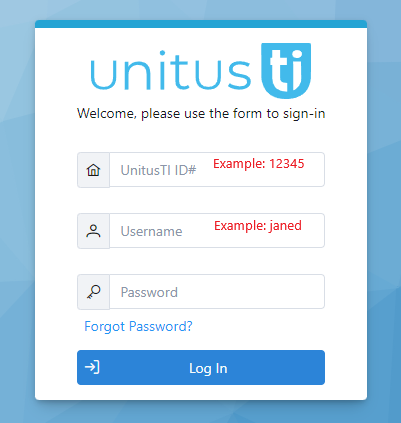
Step 1. Log in with one of the links below (choose the link where your account is located - if you are not sure, your provider can confirm this information for you):
Enter the UnitusTI ID# (a five digit number provided by the person that signed you up for this program), your username (note this is not an email address), and your password. Click login. If you have any trouble logging in, this article may help , or you can reach out to your provider for assistance.
Step 2. Navigate to the “Assessments” icon on the lefthand toolbar. Then click “Run Assessment”.
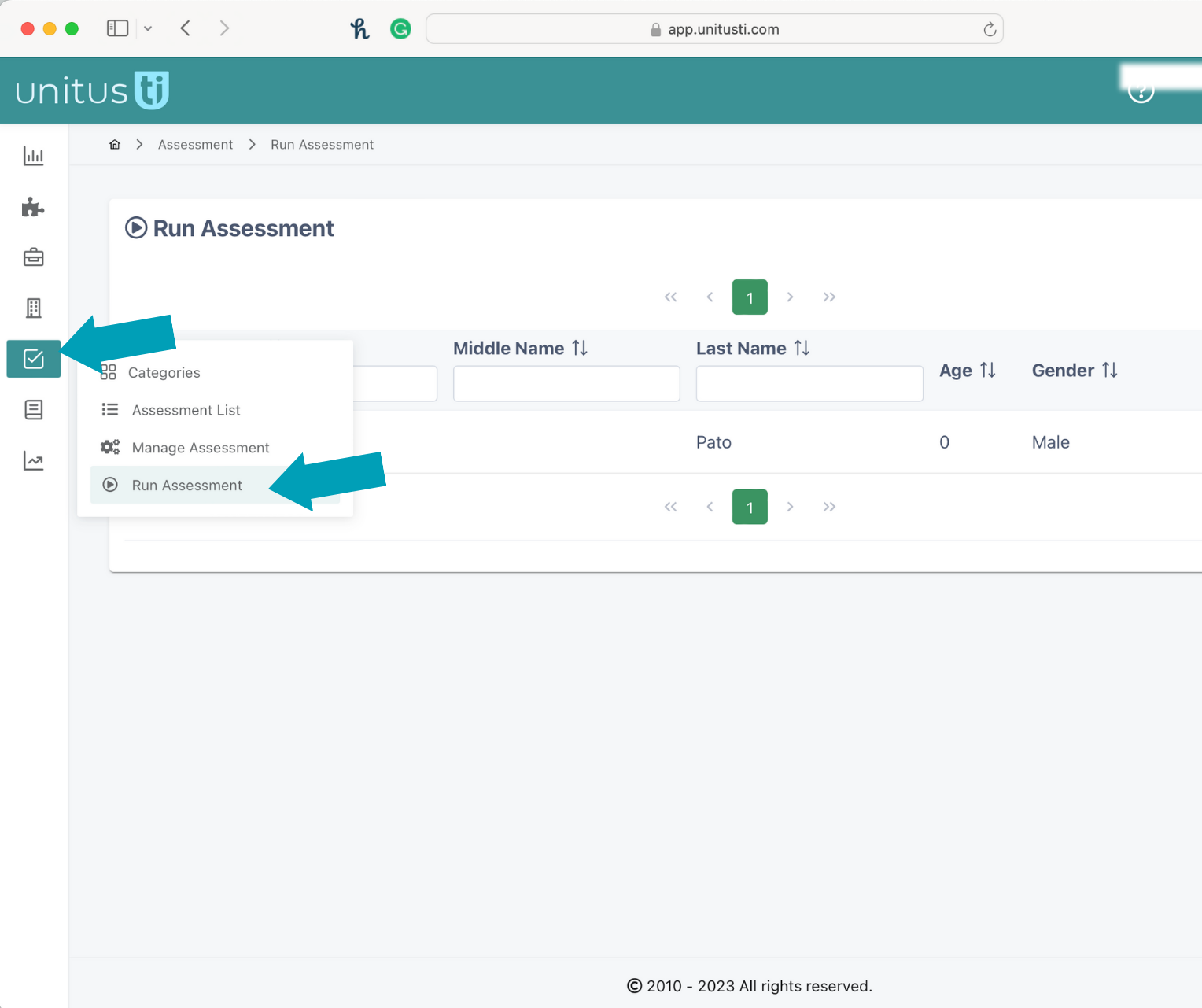
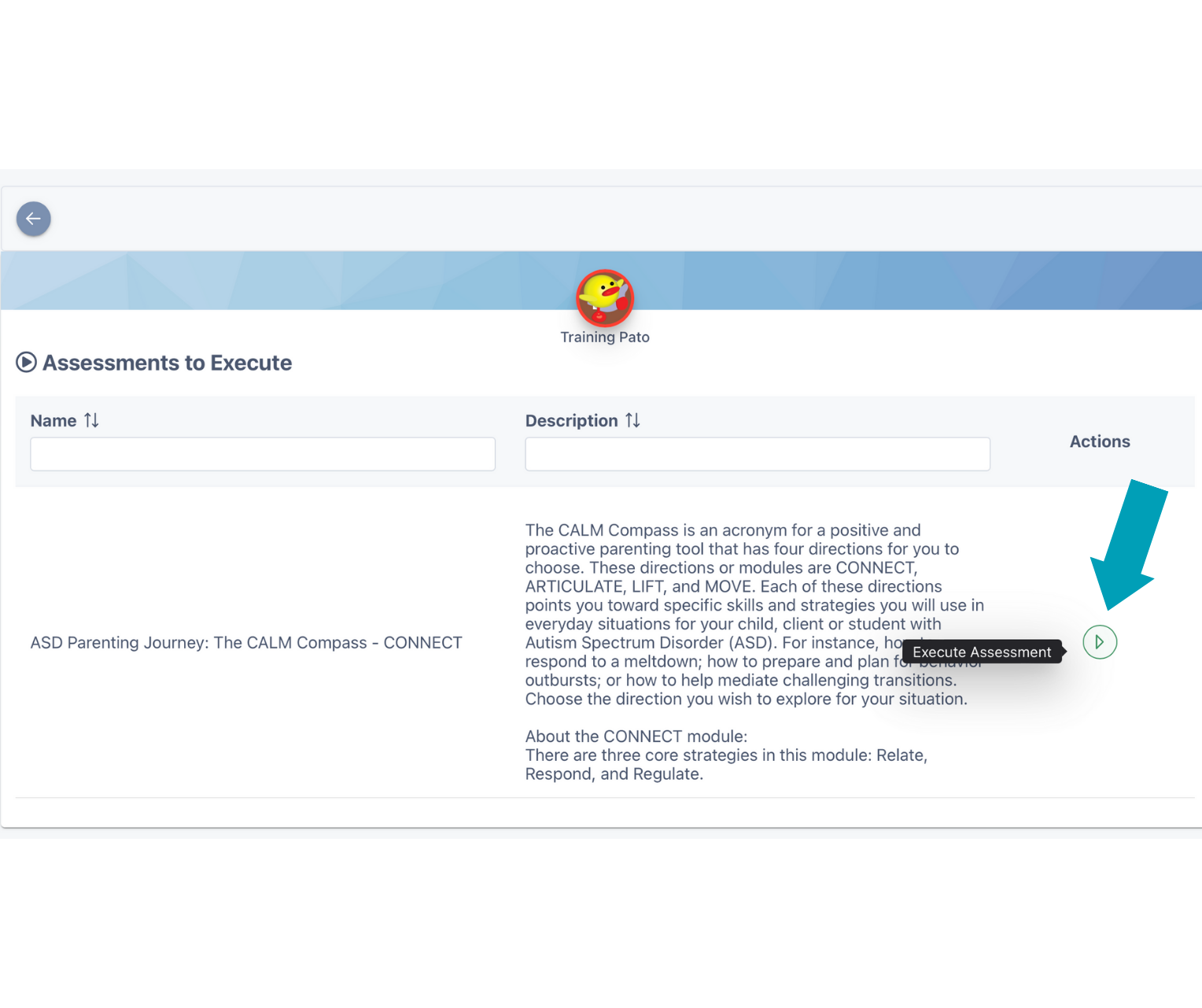
Step 3. You will now see the assessments available for you to work on. There are four directions of The CALM Compass, so there are four assessments that could be available to you at any given time. Your provider will determine which one to assign to you and that’s what you will see under “Assessments to Execute”. Select the direction you would like to work on (CONNECT, ARTICULATE, LIFT, or MOVE) and then click “Execute Assessment”.
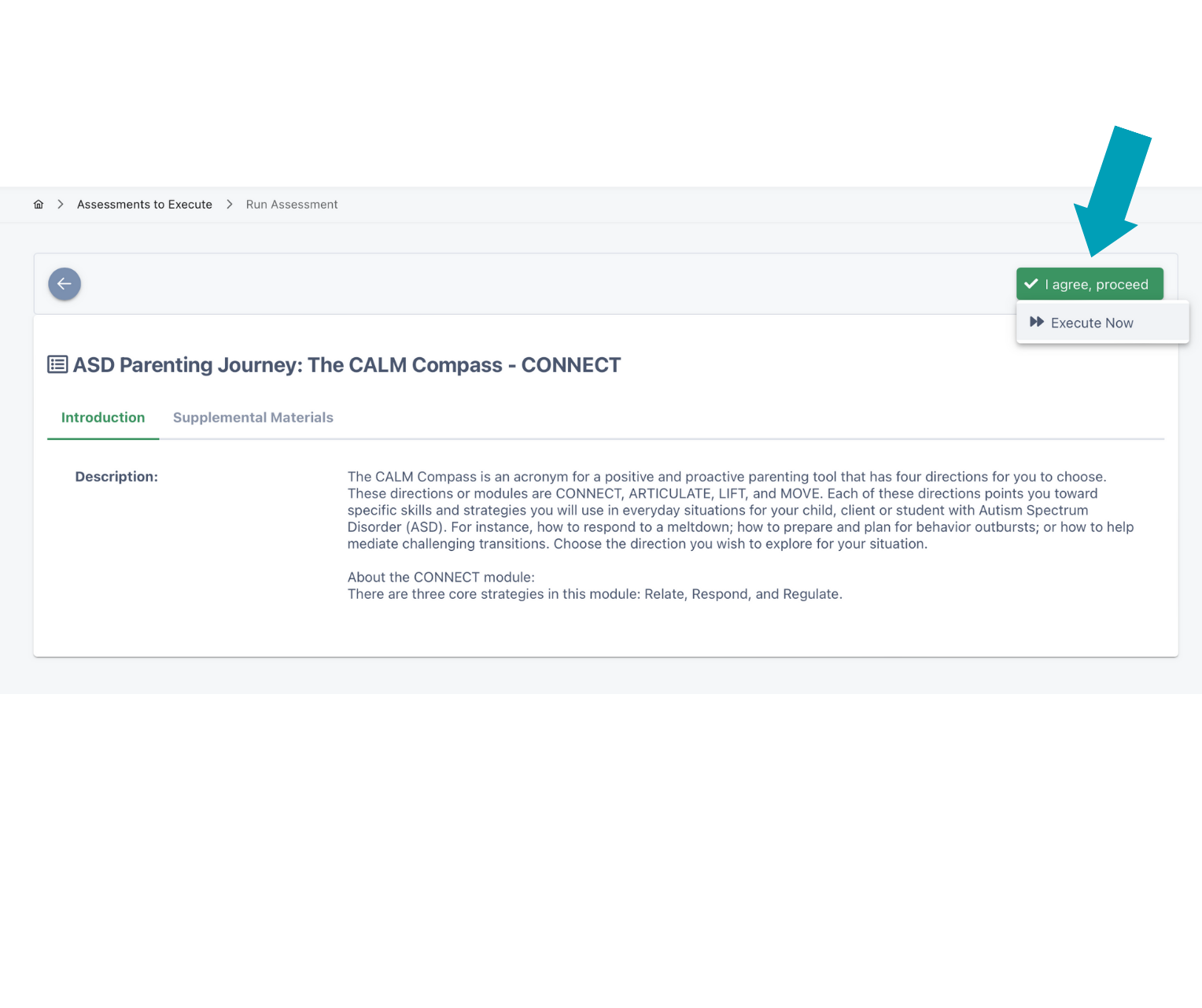
Step 4.
Click “I agree, proceed. Then click “Execute Now” to begin the program.
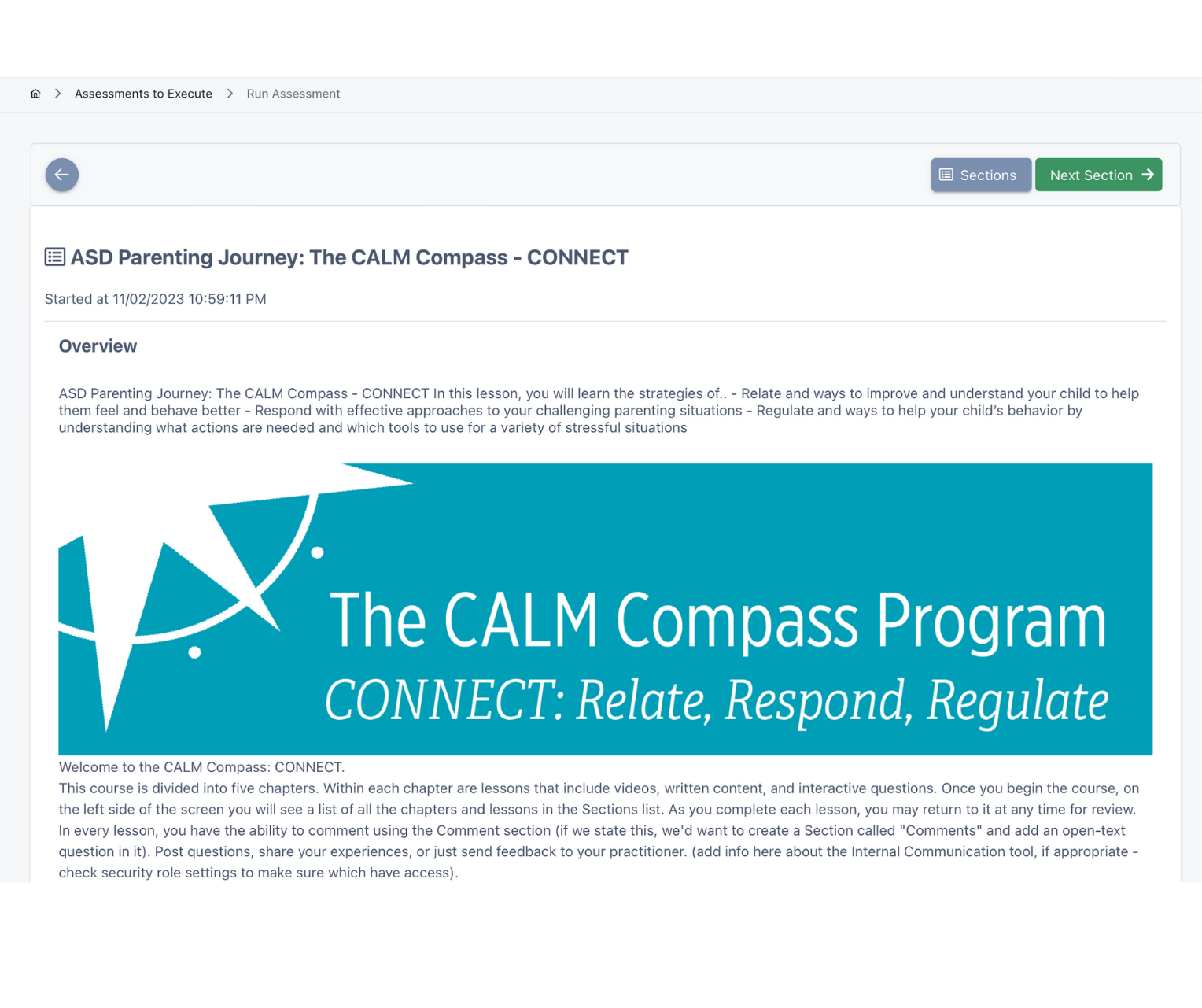
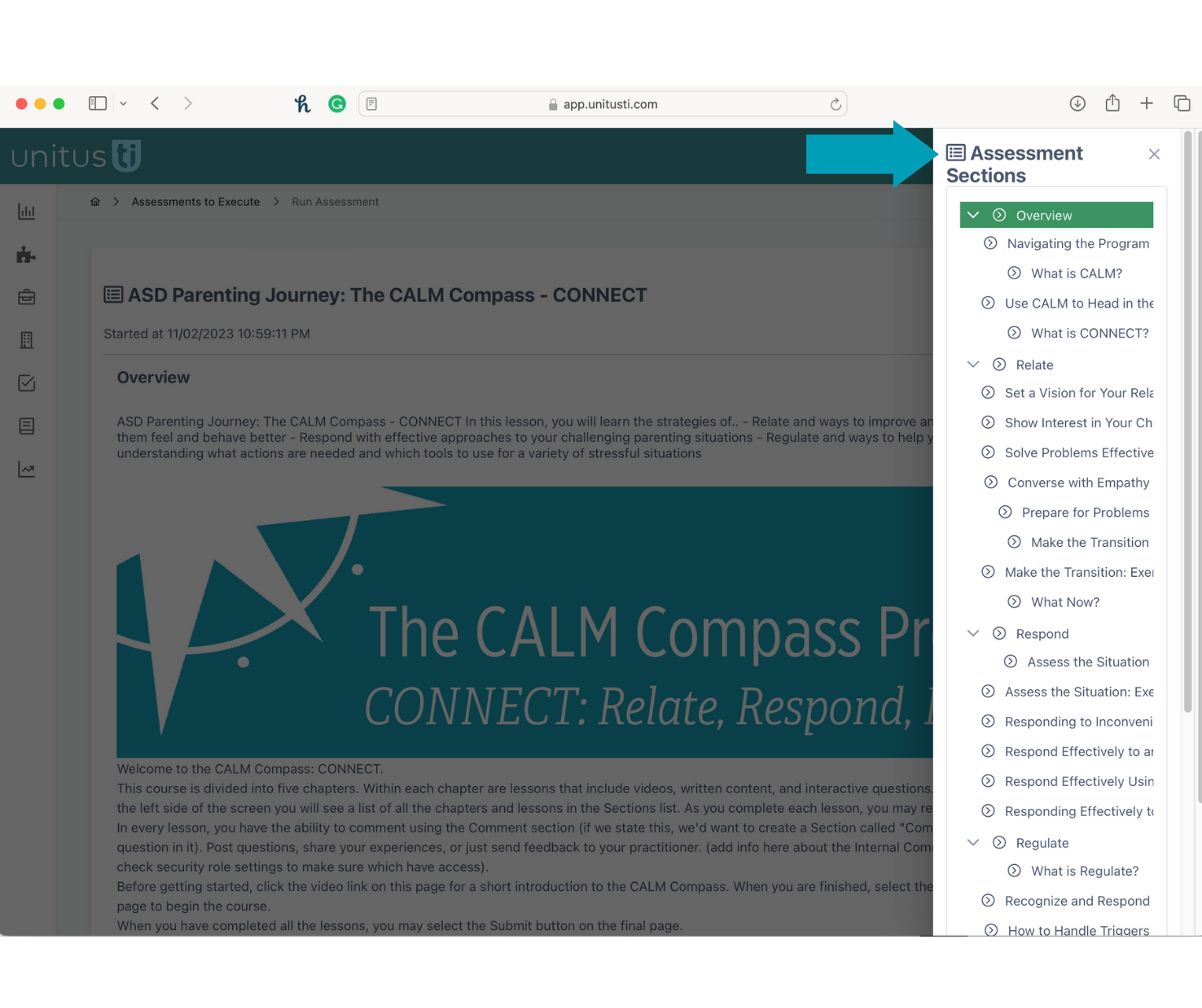
Step 5. This is a screenshot of the first lesson inside CONNECT. You will see in the top right hand corner there is a gray “sections” button. This will open up all of the lessons available so that you can navigate through the program in any order. The first time you go through, try to complete the lessons in the original order. You can go back to review the material anytime.
Please note: Some questions have images, videos, exercises, or reflection questions. If there is a video available it will be shown at the bottom of a lesson, same with the interactive questions. You must answer the true/false, yes/no, or multiple choice answers in order to continue. The open text field questions are optional, but encouraged.
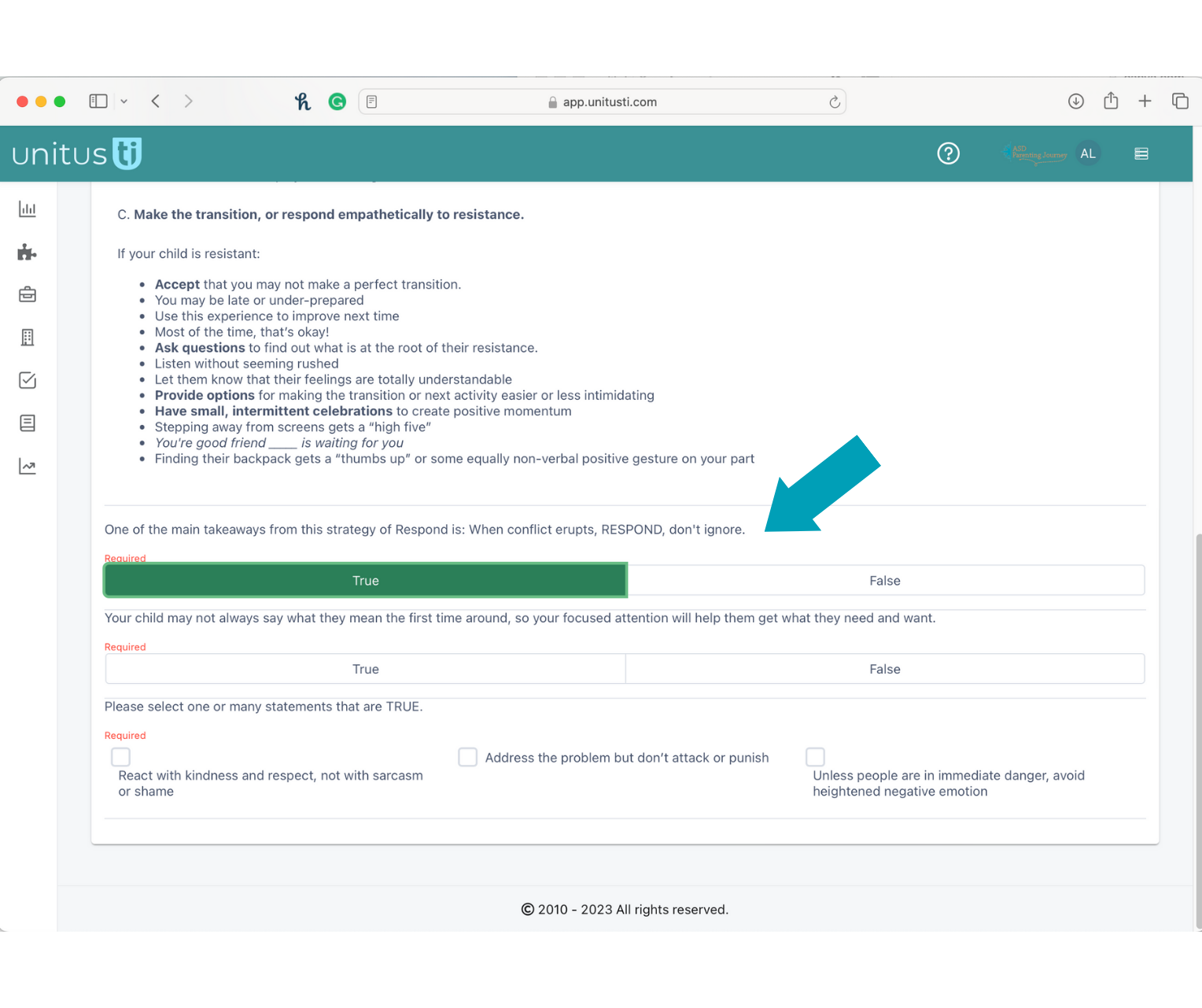
When you are finished, click “submit” to send the information to your provider. Then, you can navigate back to your “Assessments” to continue working through each of the four directions: CONNECT, ARTICULATE, LIFT, and MOVE.
The CALM Compass © 2023 Mitchell LeppicelloLeppicello and Associates LLC. All Rights Reserved.
Copyright © 2010-2025 Mundo Pato Inc. dba UnitusTI. All Rights Reserved.