EZClaim Exporter Help
Overview
Do you have an EZClaim account? Adding the EZClaim connectivity feature will allow you to export session note and service code reports in a format that may be uploaded directly to EZClaim. (Note: the EZClaim export feature is a paid add-on. Please contact sales@mundopato.com if you wish to learn more about this feature.).
Session Notes with Service Codes information can be exported in the “EZClaim Import Ver 2“ format to a file on your device that you can upload to the EZClaim application. This document explains the export procedure, along with what screens in UnitusTI are used to feed some fields of the EZClaim report, and lists common error messages that the exporter can raise and how to fix them.
Note : To learn more about how to upload the file exported from UnitusTI into EZClaim, please refer to the following links:
EZClaim help: Importing Data (Via Interfaces)
Ezclaim help: Interface Library
Exportation Procedure
This section will explain how to create and export an EZClaim formatted file. Once this file is created, log into your EZClaim account and follow their steps to import the file.
The steps to export an EZClaim report are:
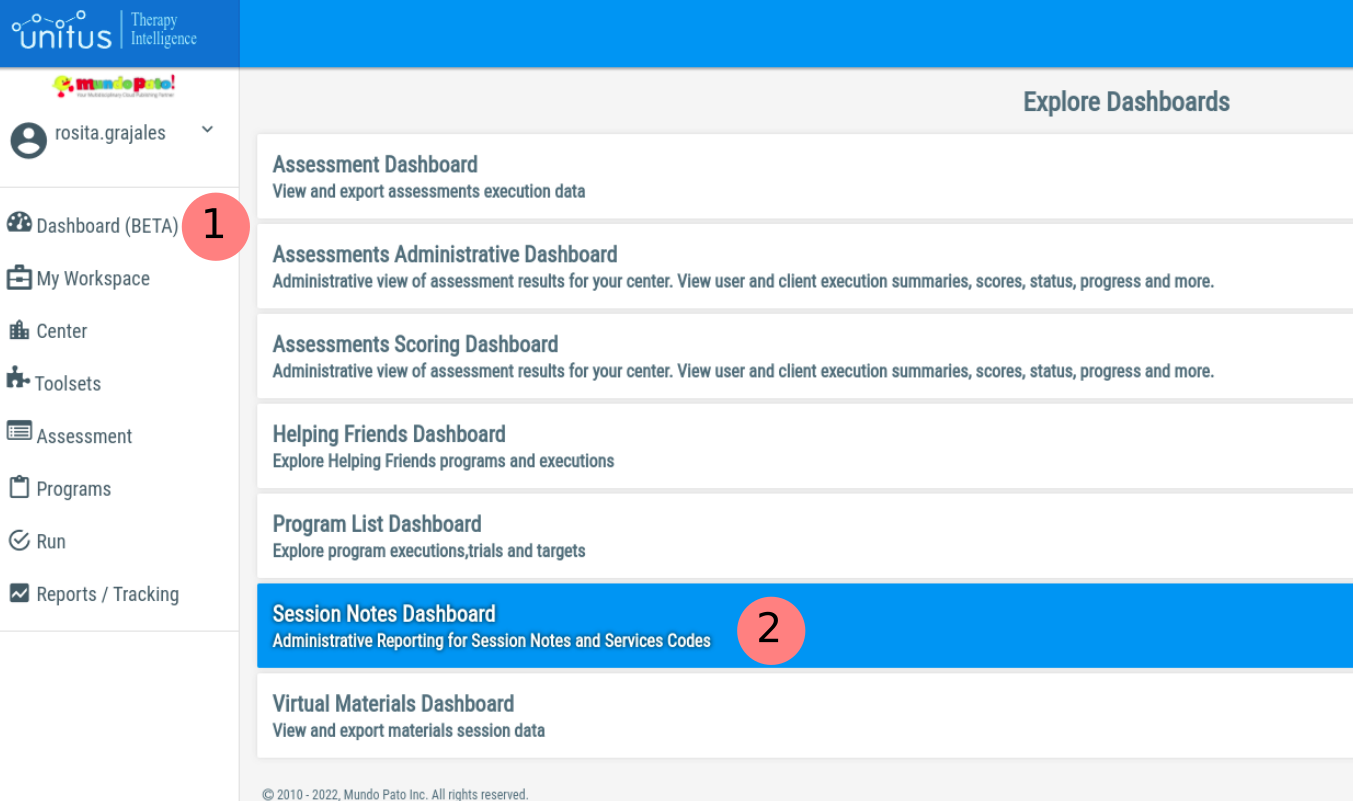
- Visit the “Dashboards - Session Notes Dashboard”
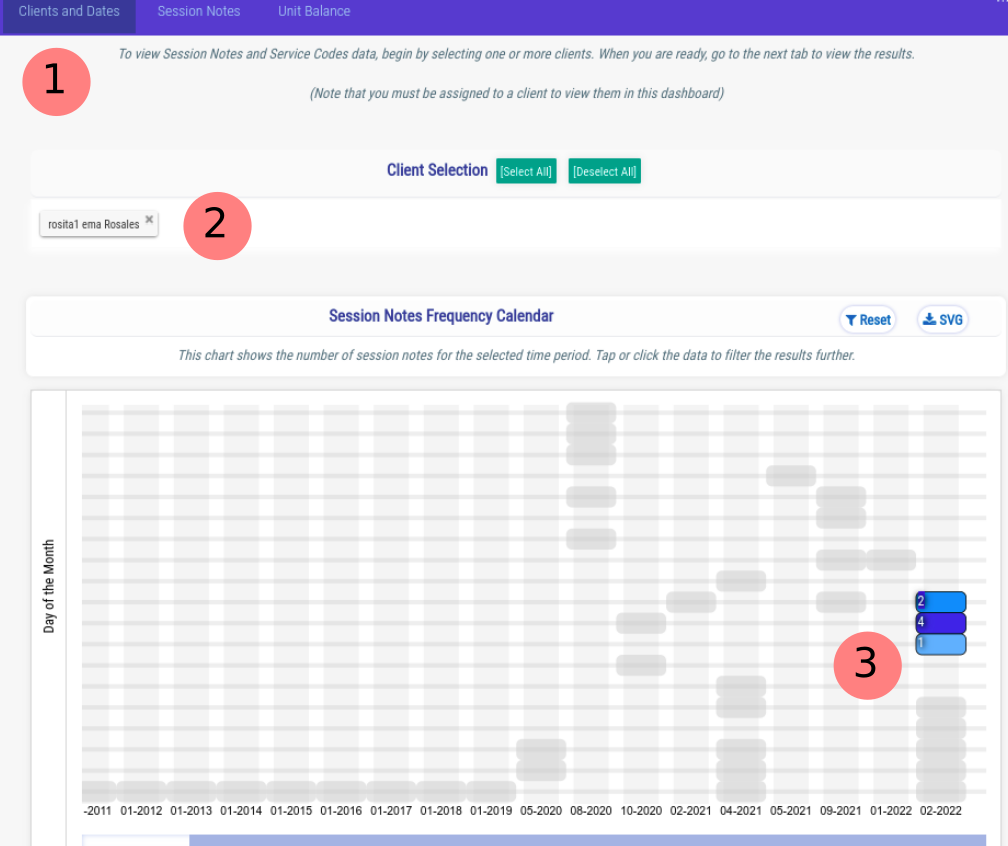
- In the first Tab (1), select the $MP{CLIENT}MP$ (2) and dates (3) that contain the Session Notes that you are interested in exporting:
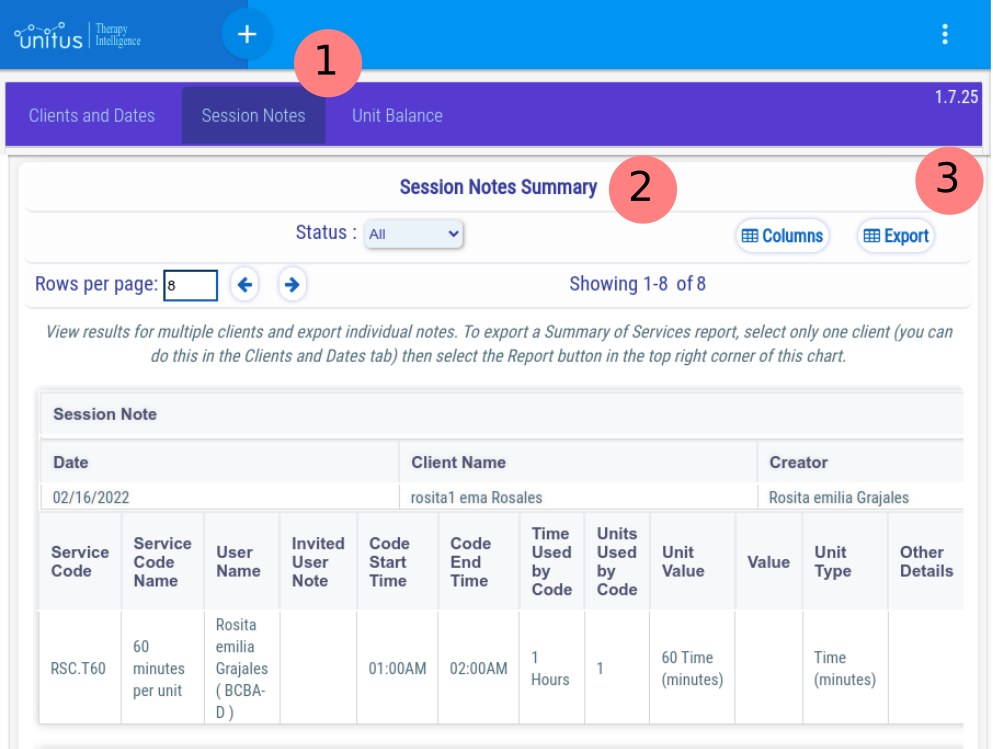
- Visit the “Session Notes” Tab (1) and look for the “Export” button (3) at the header of the “Session Notes Summary” Table (2):
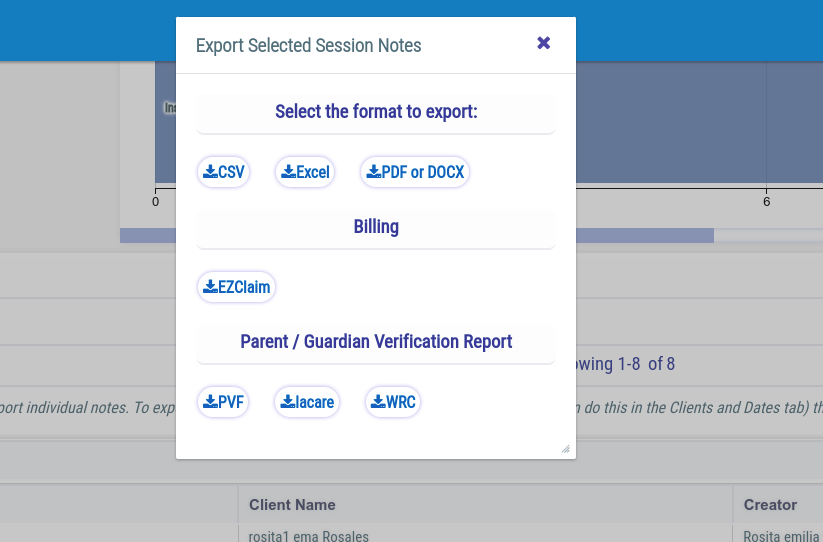
- Press the Export button. A dialog box will appear, with different export options. Select the “EZClaim” button:
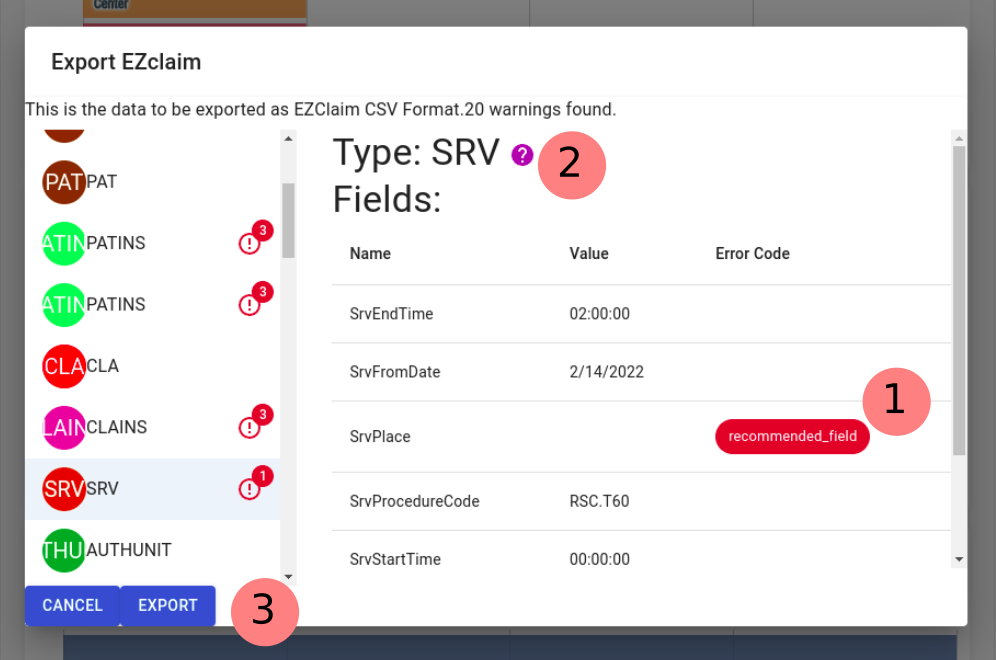
- A Preview of the EZCLaim records will be presented. Check the summary for warnings that may affect the exportation process. Remember: the presence of warnings won’t affect the exporting but may affect the importing on EZClaim.
You can click on the different error codes presented (1) to obtain more information about the specific error, and also you can click on the type of the record (2) to jump to this manual to the section that explains the Information Sources for each field.
Once you are satisfied with the review of warnings, use the “EXPORT” button at the bottom (3) to download the CSV file ready to be imported into EZCLaim!
For more help from EZClaim on their importing procedure, visit these links:
EZClaim help: Importing Data (Via Interfaces)
EZClaim help: Interface Library
Sources of Information
While EZClaim formatted reports are principally created from your session notes, the report will also pull information from other areas of UnitusTI. This section will describe these areas and where to find them so that you may input or update information necessary for your EZClaim reporting and to alleviate some EZClaim reporting errors.
│
CLIENT Record
The CLIENT record (found in My Clients) won’t be exported as part of the EZCLaim file. It is a helper to group general errors that are not part of some specific EZCLaim Record.
One example of error codes reported on a CLIENT record is “ multiple_primary_payers ”.
¬
Physician Record (PHY)
Physician records are generated for three different cases, identified by the value of the field PhyType :
- PhyType = Facility : Treatment Center
- PhyType = Billing : Treatment Center
- PhyType = Rendering : Session Note Supervisor
- PhyType = Rendering : Session Note Author
When an EZClaim report is generated, you will find that the two first PHY records contain the information of the Center, one with PhyType = Facility and the other with PhyType = Billing.
Multiple PHY records of type “rendering” will appear, listing either the User that created a Session Note or, if present, the user added to the Session Note as “Joined User” who has the role “SUPERVISOR”.
UnitusTI |
EZCLaim PHY Record |
Observations |
Center Information - Company Name |
PhyName |
required, type: text, max length: 100 |
Center Information - Address |
PhyAddress1 |
type: text, max length: 55 |
Center Information - City |
PhyCity |
type: text, max length: 30 |
Center Information - Email |
PhyEmail |
type: text, max length: 80 |
|
PhyFirstName |
type: text, max length: 35 |
|
PhyLastName |
type: text, max length: 60 |
Center Information - NPI Number |
PhyNPI |
type: text, max length: 20 |
|
PhyPrimaryCodeType |
24 for Tax ID 34 for SSN |
Center Information - Center Tax ID |
PhyPrimaryIDCode |
recommended , type text, max length: 20 |
Center Information - State |
PhyState |
type text, max length: 2 |
Center Information - Phone |
PhyTelephone |
type text, max length: 80 |
See description in the introduction of this section |
PhyType |
mandatory , type text, max length: 50 |
Center Information - Postal Code |
PhyZip |
mandatory , type text, max length: 15 |
│
Payer Record (PAY)
Payer Information is read from the “Insurance Payer” Form, found in the client record in My Clients.
This is how each field of a PAY record is associated to fields in the Insurance Payer Form:
UnitusTI - Insurance Payer Form |
EZCLaim PAY Record |
Observations |
Primary or Secondary |
|
You can have multiple forms filled for a single client, but it is expected that only one form is marked as “Primary Payer” for a successful EZCLaim loading. |
Payer Name |
PayName |
Required , type: text, max length: 50 |
Payer Address |
PayAddr1 |
type: text, max length: 50 |
Payer Address 2 |
PayAddr2 |
type: text, max length: 50 |
Payer City |
PayCity |
type: text, max length: 20 |
Payer State |
PayState |
type: text, max length: 2 |
Payer Zip |
PayZip |
type: text, max length: 10 |
|
Patient Record (PAT)
Patient Information is read from the different sources within the Client Information page, such as the records created in the Client Diagnosis form or information input into some of the fields in the tabs area, like Demographic, Other Providers or Other Info (see screenshot below).
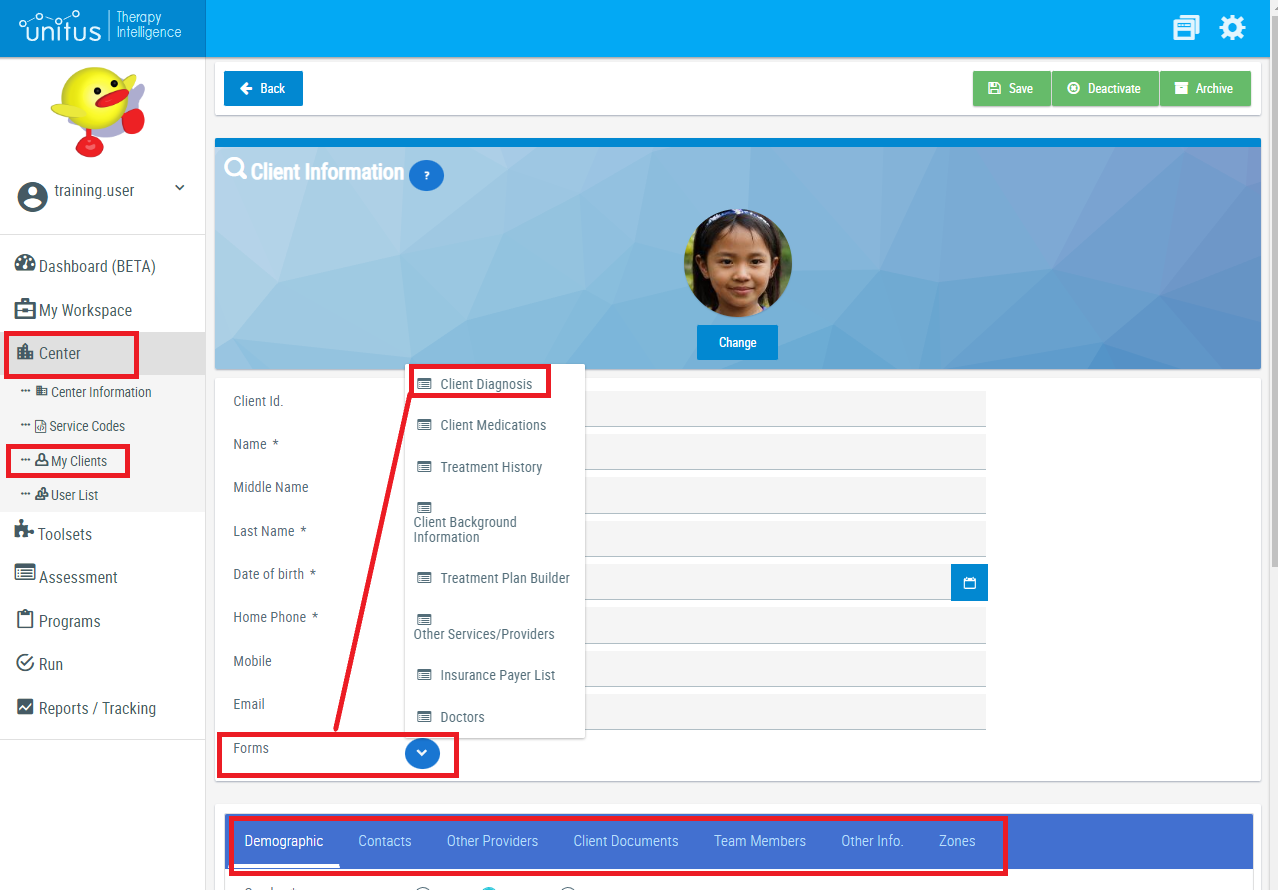
This is how each field of a PAY record is associated to fields in the Client Diagnosis records:
UnitusTI - Client Profile |
EZCLaim PAT Record |
Observations |
Client Information - Name |
PatFirstName |
Required, type: text, max length: 50 |
Client Information - Last Name |
PatLastName |
Required, type: text, max length: 50 |
Client Information - Middle Name |
PatMI |
type: text, max length: 5 |
Client Information - Date of Birth |
PatBirthDate |
type: date |
Client Information - Client Id |
PatAccountNo |
type: text, max length: 50 |
Demographic Tab - Home Address |
PatAddress |
type: text, max length: 50 |
|
PatBillingPhyName |
type: text, max length: 100 |
Client Information - Mobile |
PatCellPhoneNo |
type: text, max length: 25 |
Demographic Tab - City |
PatCity |
type: text, max length: 50 |
Diagnosis Input Form |
|
The system will read from all the Diagnosis Forms available for each client, up to four records. |
Diagnosis Code |
PatDiagnosis1 |
type: text, max length: 50
|
PatDiagnosis2 |
||
PatDiagnosis3 |
||
PatDiagnosis4 |
||
Client Profile |
|
|
Contacts Tab - Name |
PatEmergencyContactName |
type: text, max length: 100 |
Contacts Tab - Work Phone |
PatEmergencyContactPhoneNo |
type: text, max length: 25 |
Contacts Tab - Relationship |
PatEmergencyContactRelation |
type: text, max length: 50 |
|
PatEmployed |
0 () 1 (Employed) 2 (Full-Time Student) 3 (Part-Time Student) |
|
PatFacilityPhyName |
type: text, max length: 100 |
|
PatMarried |
0 () 1 (Single) 2 (Married) 3 (Other) |
Client Information - Home Phone |
PatPhoneNo |
type: text, max length: 25 |
Client Information - Email |
PatPriEmail |
type: text, max length: 255 |
Demographic Tab - Gender |
PatSex |
M (Male) F (Female) |
|
PatRenderingPhyName |
type: text, max length: 100 |
Demographic Tab - State/Province |
PatState |
type: text, max length: 10 |
Demographic Tab - Postal Code |
PatZip |
type: text, max length: 20 |
|
Patient Insured Record (PATINS)
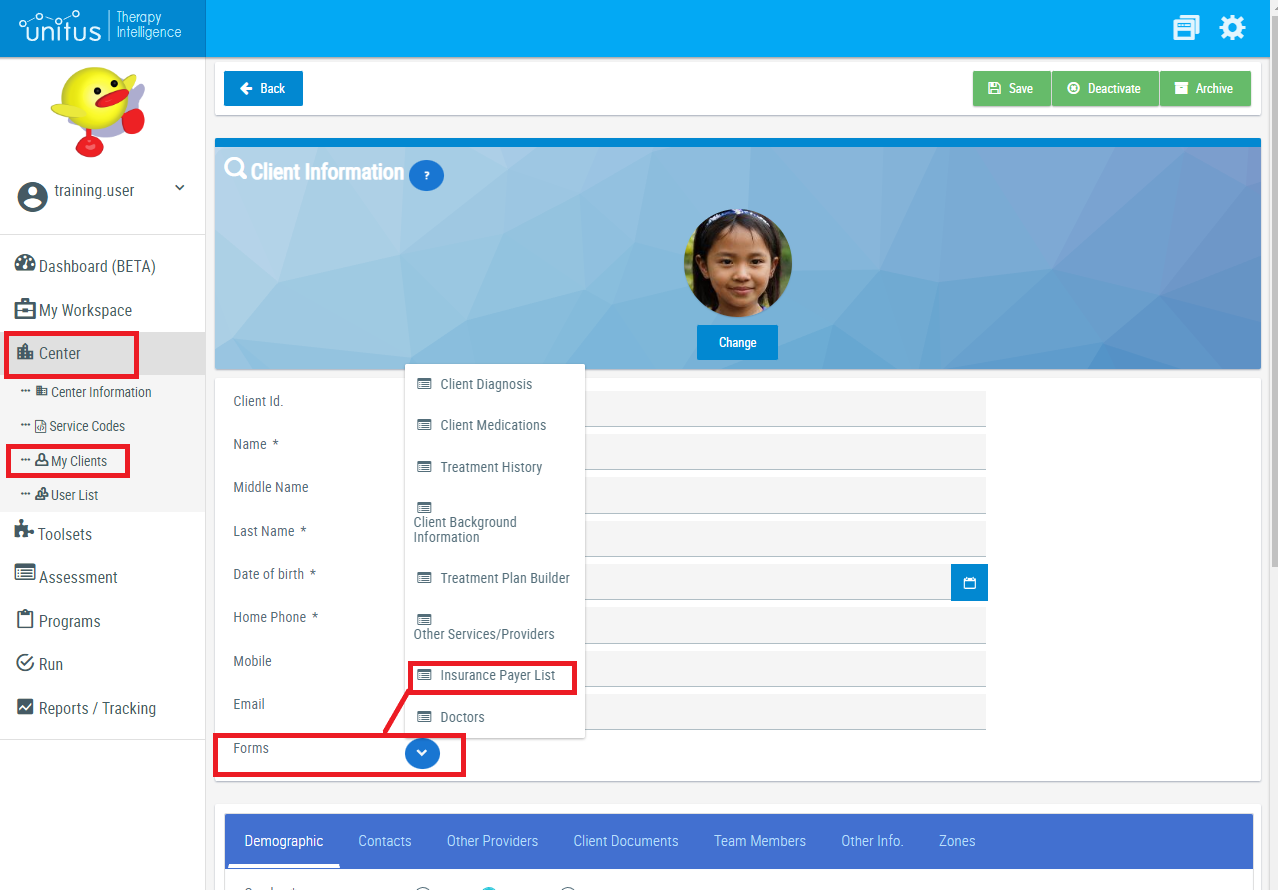
The Source for this record is the Insurance Payer List form (see screenshot below).
UnitusTI - Insurance Payer Forms |
EZCLaim PATINS Record |
Observations |
Insured First Name |
InsFirstName |
Required, type: text, max length: 50 |
Insured Last Name |
InsLastName |
Required, type: text, max length: 50 |
Insured Middle Initial |
InsMI |
type: text, max length: 5 |
Insured Home Address |
InsAddress |
type: text, max length: 50 |
Insured Date of Birth |
InsBirthDate |
type: date |
City of the Insured |
InsCity |
type: text, max length: 50 |
“Select according to your carrier the Claim Filling Indicator” |
InsClaimFilingIndicator |
type: text, max length: 5 |
Insured ID Number |
InsIDNumber |
type: text, max length: 50 |
Payer Name |
InsPayName |
required, type: text, max length: 50 |
Insured Phone |
InsPhone |
type: text, max length: 25 |
Insured Sex |
InsSex |
type: text, max length: 1 |
Insured Social Security Number |
InsSSN |
type: text, max length: 15 |
Home State |
InsState |
type: text, max length: 10 |
Home Postal Code |
InsZip |
type: text, max length: 20 |
Insured Relation of the Patient to the Insured |
PatInsRelationToInsured |
type: number: 1 (Self), 2 (Spouse), 3 (Child), 5 (Employee), 4 (Other) |
│
Claim Record (CLA)
This Record has different sources:
- The fields “ClaDiagnosis1” up to “ClaDiagnosis12” are read from the available “Diagnosis Form” on the Client Profile.
- The Billing, Facility and Rendering names are read from the corresponding PHY records.
- Some fields are exported empty, but they may be filled after they have been uploaded to EZClaim
UnitusTI - |
EZCLaim CLA Record |
Observations |
from PHY record of type “Billing” (Organization Name) |
ClaBillingPhyName |
type: text, max length: 50 |
Diagnosis Form - Diagnosis Code |
ClaDiagnosis1, ClaDiagnosis2, … ClaDiagnosis12 |
type: text, max length: 20 |
from PHY record of type “Facility” (Organization Name) |
ClaFacilityPhyName |
type: text, max length: 100 |
not filled |
ClaOrderingPhyName |
type: text, max length: 100 |
From PHY record of type “Rendering” (author of the Session Note or Supervisor if available) |
ClaRenderingPhyName |
type: text, max length: 100 |
not filled |
ClaAmbPickUpAddress |
type: text, max length: 111 |
not filled |
ClaAmbPickUpCity |
type: text, max length: 30 |
not filled |
ClaAmbPickUpLocationName |
type: text, max length: 60 |
not filled |
ClaAmbPickUpState |
type: text, max length: 15 |
│
Claim Insured Record (CLAINS)
The fields from the CLAINS Record comes mostly from the Insurance Payer Form (Remember that it is expected one and only one Insurance Payer Form marked as Primary for each client).
UnitusTI - Insurance Payer Form |
EZCLaim CLAINS Record |
Observations |
Insured First Name |
ClaInsFirstName |
type: text, max length: 50 |
Insured Last Name |
ClaInsLastName |
required, type: text, max length: 50 |
Insured Middle Initial |
ClaInsMI |
type: text, max length: 5 |
Insured Home Address |
ClaInsAddress |
type: text, max length: 50 |
Insured Date of Birth |
ClaInsBirthDate |
type: date |
City of the Insured |
ClaInsCity |
type: text, max length: 50 |
“Select according to your carrier the Claim Filling Indicator” |
ClaInsClaimFilingIndicator |
type: text, max length: 5 |
Insured ID Number |
ClaInsIDNumber |
type: text, max length: 50 |
Payer Name |
ClaInsPayName |
required, type: text, max length: 50 |
Insured Phone |
ClaInsPhone |
type: text, max length: 25 |
Service Code Authorization Number* |
ClaInsPriorAuthorizationNumber |
type: text, max length: 50 *This value comes from the Session Notes, not from the Insurance Payer Form. |
“Insured Relation of the Patient to the Insured” |
ClaInsRelationToInsured |
type: number |
Insured Sex |
ClaInsSex |
type: text, max length: 1 |
Insured Social Security Number |
ClaInsSSN |
type: text, max length: 15 |
Home State |
ClaInsState |
type: text, max length: 10 |
Home Postal Code |
ClaInsZip |
type: text, max length: 20 |
│
Service Code Record (SRV)
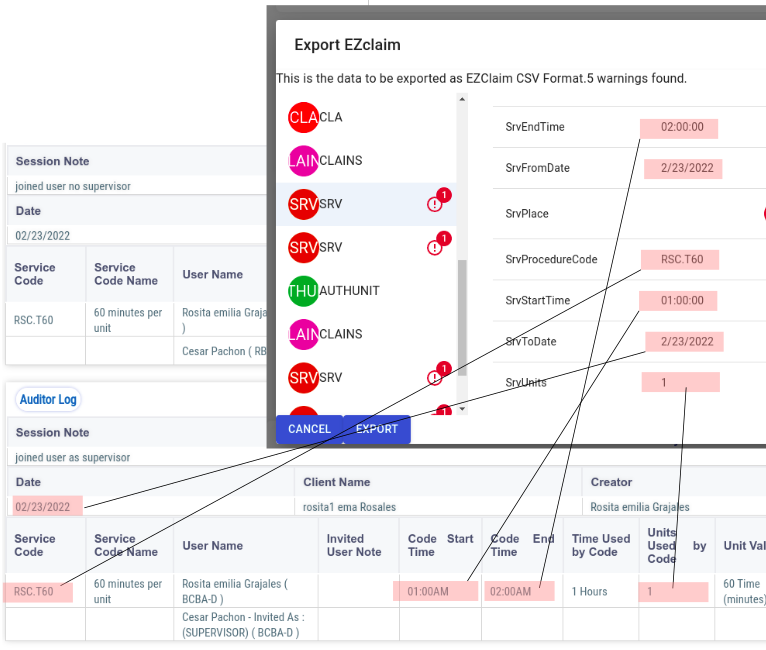
Service Code Records are extracted from the selected Session Notes in the Dashboards .
Only Session Notes that have associated Service Codes will be included.
The following screenshot illustrates the relationship between the Session Notes fields and the SRV fields:
UnitusTI - Session Note |
EZCLaim SRV Record |
Observations |
Code End Time |
SrvEndTime |
|
Date |
SrvFromDate |
|
|
SrvPlace |
recommended, |
Service Code |
SrvProcedureCode |
|
Code Start Time |
SrvStartTime |
|
Date |
SrvToDate |
|
Units Used By Code |
SrvUnits |
|
│
AUTHUNIT Record
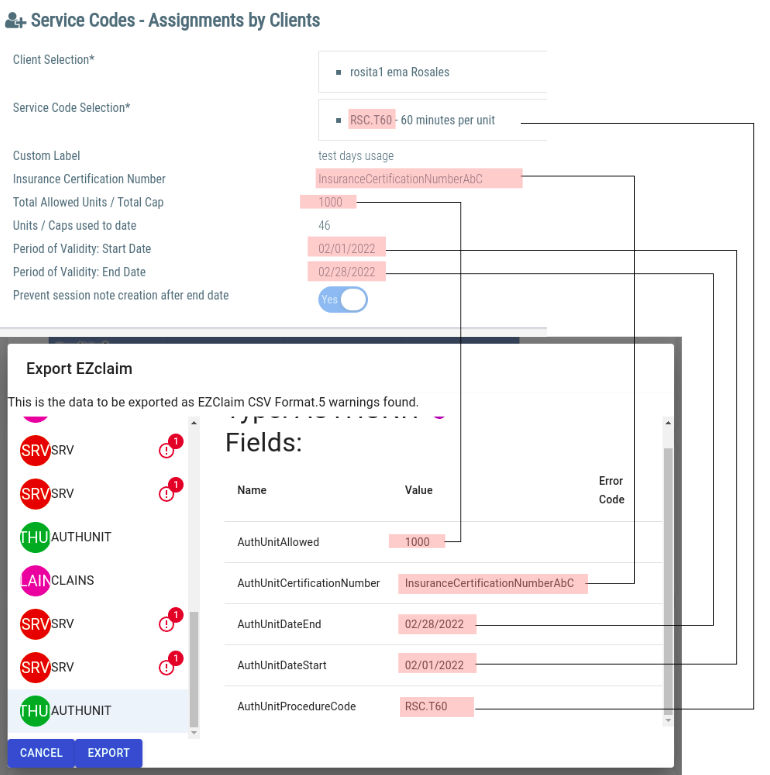
For each group of Service (SRV) records, one AUTHUNIT record will be created.
The information for this record is extracted from the Unit Balance of the Client, for the given Service Code .
The following picture illustrates the relationship between a Service Code Client Assignment and the AUTHUNIT record:
UnitusTI |
EZCLaim AUTHUNIT Record |
Observations |
Total Allowed Units |
AuthUnitAllowed |
|
Insurance Certification Number |
AuthUnitCertificationNumber |
|
Period of Validity: End Date |
AuthUnitDateEnd |
|
Period of Validity: Start Date |
AuthUnitDateStart |
|
Service Code |
AuthUnitProcedureCode |
|
Common Warning Codes
│
multiple_primary_payers
Payer information comes from the “Insurance Payer List” Input Forms, that can be found in the Profile of each Client.
You can have multiple Insurance Payer Forms, for example to keep a record of changes of the payer over time, but the system expects only one to be marked as “Primary”.
If there are more than one Primary Payer per Client, the records in the report will be duplicated and marked as duplicated warnings on the EZClaim importer tool.
To Fix this error : Check that only one Payer is marked as “Primary”.
│
client_without_primary_payer
The client should have only one Insurance Payer Form marked as “Primary”.
This error indicates that either the client has no Insurance Payer Forms filled, or that none of the filled Insurance Payer Forms are marked as primary.
Be sure that the client has at least one Insurance Payer Form filled and marked as “Primary” in the Client Profile - Forms - “Insurance Payer List”.
│
recommended_field
This error code indicates that a field is not mandatory for EZClaim, so it can be exported empty, but it is recommended that some value is provided to ensure the most complete report is uploaded to EZCLaim.
│
value_in_values
This error code indicates that the field expects that the provided value be one of a list of predefined values.
Please check the documentation of the EZClaim type to discover what values are valid.
│
greater_than_max
For fields of type string , it means that the provided value is a text with a length greater than the maximum expected.
For fields of type number, the value of the number is greater than the maximum allowed.
Please check the documentation of the EZClaim type to discover what is the maximum value for the field.
│
minor_than_min
For fields of type string , it means that the provided value is a text with a length smaller than the minimum expected.
For fields of type number, the value of the number is smaller than the minimum allowed.
Please check the documentation of the EZClaim type to discover what is the minimum value for the field.
│
expects_string
The value provided should be of type String .
│
expects_boolean
The value provided should be of type true/false .
│
expects_integer
The value provided should be of type number (Integer).
│
expects_float
The value provided should be of type number (decimal).
│
expects_date
The value provided should be a date .
│
invalid_year_or_month
A field of type date received a valid format but the values for year or month are invalid.
│
invalid_day
A field of type date received a valid format but the value for day is invalid.
│
Troubleshooting
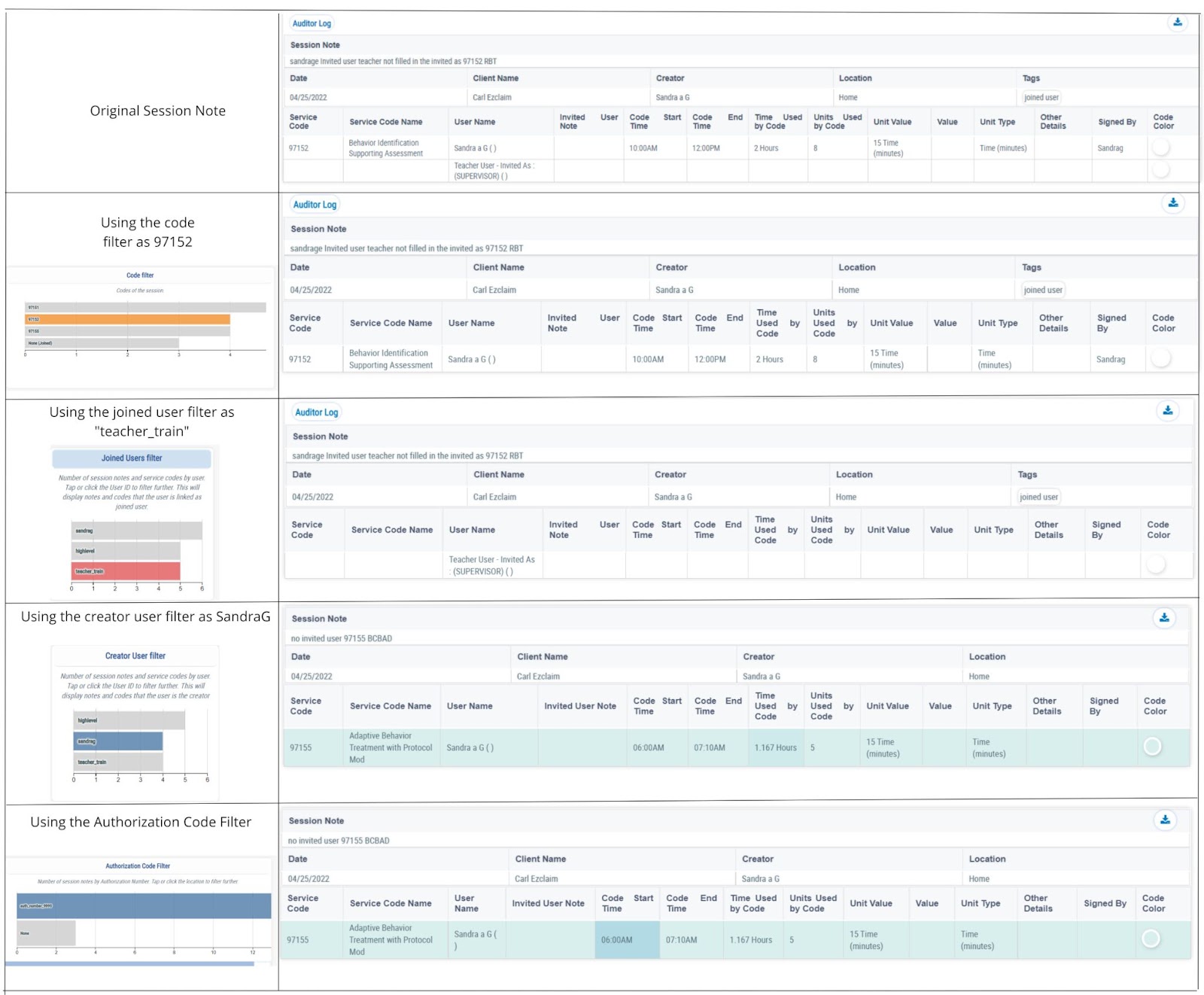
Is there information missing in your EZClaim Report? Please review the filters that you are using in the Session Notes Dashboard, the following filters can affect the information shown in the EZclaim Report and in the Summary of session notes.
- Creator User Filter
- Joined User Filter
- Code Filter
- Authorization Code Filter
Click here to view the picture with more resolution