“Invalid End Date” when trying to edit a Client Service Code Assignment
When you try to edit a Client Service Code Assignment by reducing the Period of Validity, you may get an error saying “Invalid End Date”.
This error is caused because there are Session Notes linked to this assignment whose dates are out of the new Date Range.
Example:
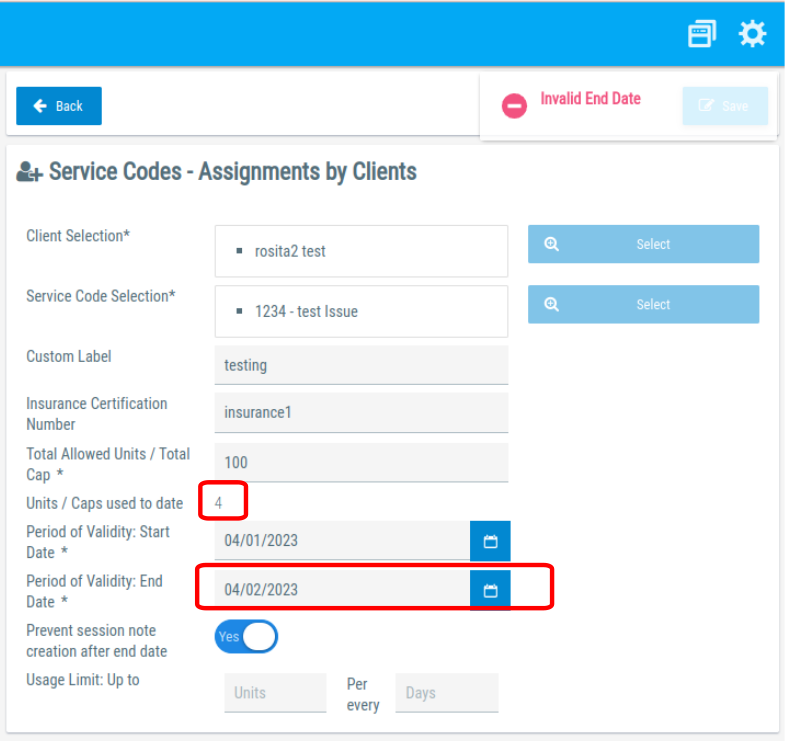
In this screenshot, we had created an assignment with an original Period of Validity from 04/01/2023 to 04/31/2023, and we created a Session Note that used 4 units and was created at 04/16/2023 (the middle of the Period of Validity).
Now, we try to change the End Date to 04/02/2023, before the date of the Session Note. That fires the error message:
The quickest solution is to uncheck the “Prevent Session Note creation after end date”, this will make UnitusTI accept the Session Notes created on dates outside the assignment range.
As an alternative, if you want to keep the Session Notes inside the valid date range, you will need to edit the Sesion Note to make the date valid with the new date range of the Assignment. Once you are sure all the Session Notes dates are in the valid range, you can edit the End Date without raising errors.