To grant parents or caregivers access to review their child's information, you will want to create a new user in the User List for that parent/caregiver. You can review the security roles table to help you determine what security role they should be assigned depending on what area(s) of the system they need to visit. Once you have created their account, assign them to their child(ren)’s client profile and provide them with their login information (URL, UnitusTI ID, User ID, Password); UnitusTI does not automatically send this information to users.
Tutorial video: Creating a New System User
Tutorial video: Assigning Clients to Users
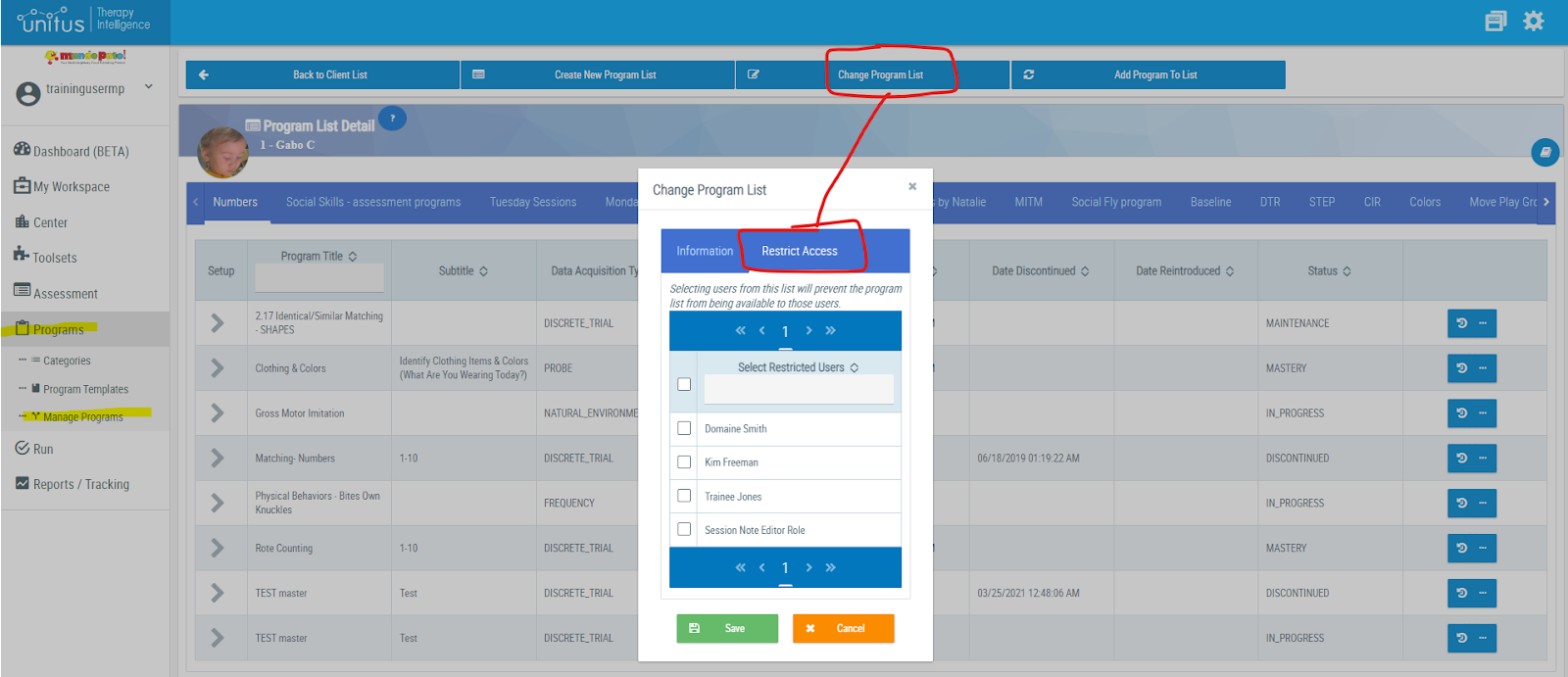
Tip: If you assign a security role that allows a parent/caregiver to run programs for their child at home, you may also find it helpful to restrict their access to the program list(s) they should not access by going to the Change Program List button in the client Program List Detail page (found in Programs/Manage Programs). Select the program list you wish to restrict them from, then select the Restrict Access tab, then check the box next to their name and Save (see screenshot below):
Our content department has put together a series of informational videos that are aimed at helping parents and caregivers learn to navigate UnitusTI and review their child's progress; topics covered include using the workspace, running programs, and reviewing progress. You can find the videos here: http://www.mundopato.com/parent-tutorial-videos . Please feel free to share these videos with parents and caregivers as needed.
Tutorial training site for parents