Session Notes in UnitusTI are a highly versatile tool that can be customized to meet the specific needs of your organization. These notes can be utilized to track Service Code usage, collect signatures, attach files, and incorporate various optional fields such as Program Execution Records and SOAP notes.
However, there may be instances when you need to record information that does not fit into any of the existing Session Notes fields. With Additional Fields, you can create as many custom records as necessary to capture this information.
Adding Additional Fields
To use Additional Fields, simply click the "Additional Field" button located directly below the Session Note Description (see picture below). A dialog box will then appear, prompting you to enter the name and description for the new field.
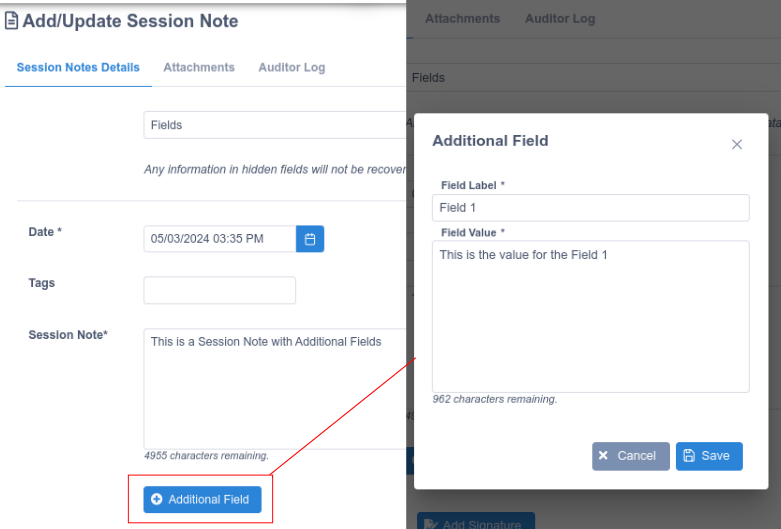
You can add, edit, and delete as many additional fields as you wish.

Viewing Additional Fields
If available, additional fields will appear in the Session Notes Dashboard. If they do not appear, please check the "Columns" options to ensure they are selected.
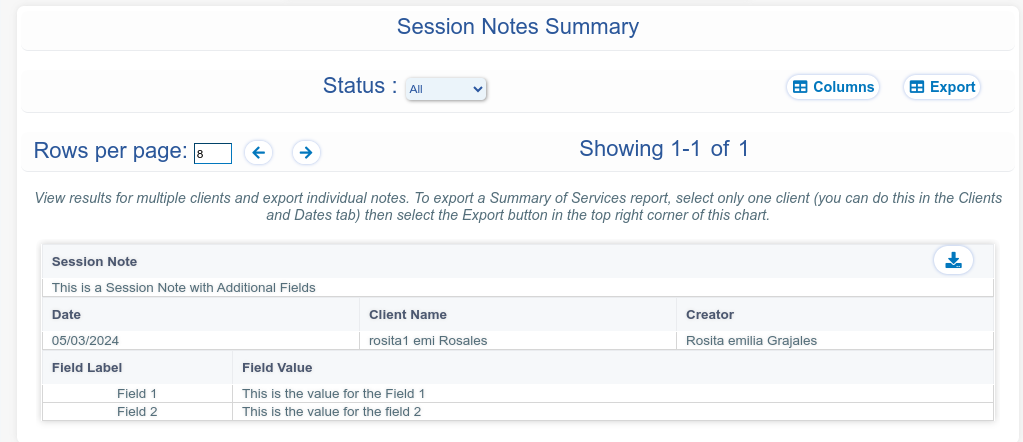
Additional fields are included in the PDF and DOCX exporters for both the summary report and the individual report. However, in the current version, they are not included in the Excel exporter.